
Introduction: The Feature Store: The Key to AI That Works Every Time
You know that awful feeling when your ML model works perfectly in development but fails in production? Yes, we’ve all been there. Who did it? Features that don’t always work the same way.
Your data scientists spend weeks making the perfect features for training, but then engineering teams have to build them all over again for deployment. Different logic, different timing, and different outcomes. It’s like playing telephone with your data; by the time it gets to production, the message is all messed up.
That’s where feature stores come in, and they are really changing the way AI teams work all over the world.
What Is a Feature Store, Anyway?
Let’s stop using technical language for a moment.
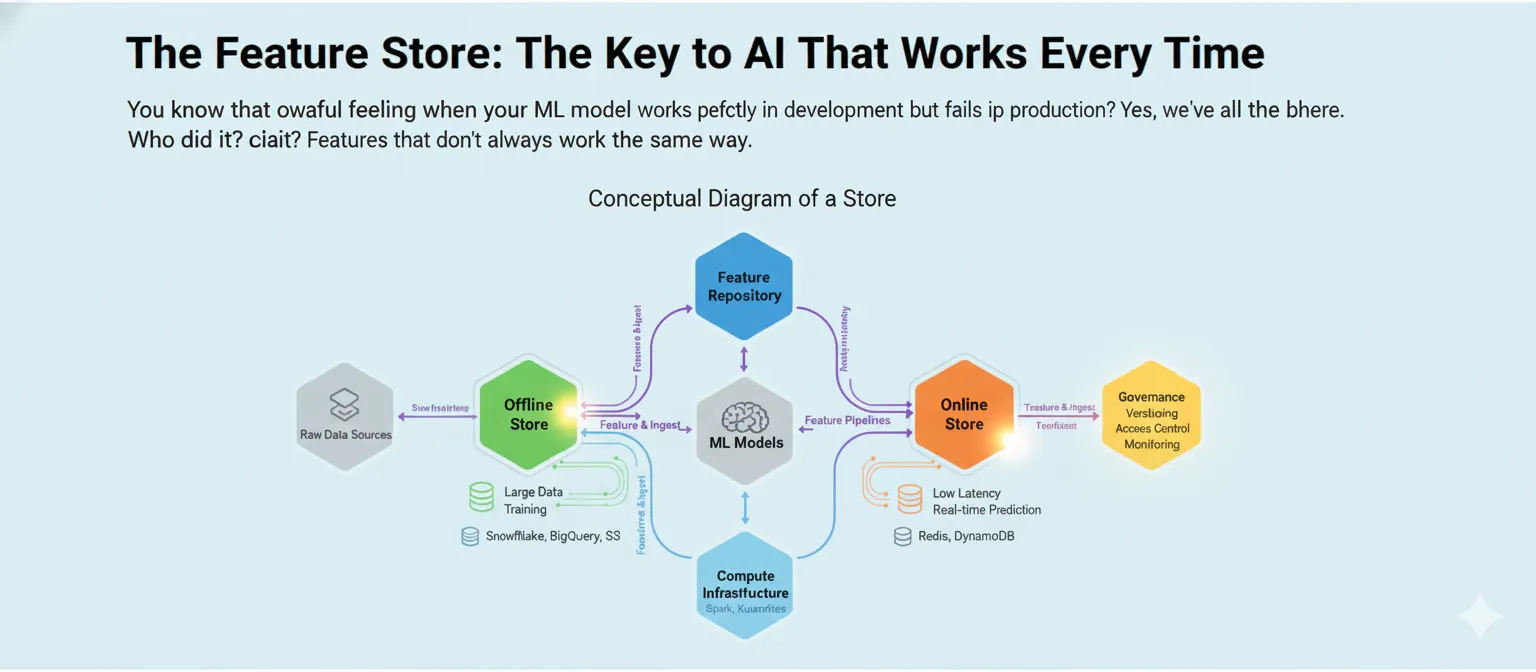
Think of a feature store as a library where all of your machine learning features live, breathe, and are served to your models. It’s not just a place to keep things. It’s a whole system that keeps track of, manages, and delivers the same features to both your training pipelines and your production models.
Here’s what makes it special: instead of data scientists and engineers working in separate groups and making the same features twice with slightly different ways of doing things, everyone uses the same source. One definition, one way to do things, and the same results every time.
Taking Apart the Parts
A feature store isn’t just one thing; it’s a collection of parts that work together:
The Feature Registry is like a list. It keeps track of all the features you’ve made, who made them, when they were last updated, and how they’re calculated. Think of it as your encyclopedia of features.
The Offline Store takes care of old data. This is where you keep a lot of feature data for training models and making batch predictions. It’s made to handle a lot of data, not to be fast, and it usually lives in data warehouses like Snowflake, BigQuery, or S3.
Speed is what the Online Store is all about. This is where your model looks when it needs features to make predictions in real time, like finding fraud in milliseconds. We’re talking about Redis, DynamoDB, or other databases with low latency that can serve features in less than 10 milliseconds.
Feature Pipelines link everything together. They turn raw data into features and make sure that both stores are up to date.
Why Your ML Team Needs This Right Now
Come on, it’s hard enough to make ML models. But keeping them running in production? That’s where teams really have a hard time.
The Problem with Training and Serving Skew
This is probably the most annoying thing about ML in production. Your model learns patterns during training by looking at certain features. But if those features are calculated even a little bit differently in production, your model’s accuracy goes down the drain.
Think about training a fraud detection model with a customer’s “average transaction amount over 30 days.” You do the math perfectly when you train it. But in production, someone accidentally codes it as “average over 15 days.” Now your model is making decisions based on inputs that are completely different from what it learned. Not good.
Feature stores get rid of this problem by making sure that the same logic for computing features runs everywhere.
Time is money (for real)
It’s not talked about enough that data scientists spend 60–80% of their time on feature engineering. That’s weeks of work, and a lot of the time you’re just making features that are already in use somewhere else in the company.
With a feature store, one person makes a feature, writes down how to use it, and then everyone can use it. The fraud team, the personalization team, or anyone else who needs it can use your recommendation team’s “user engagement score” again.
Companies say that after using feature stores, their time to production is 40% faster. That’s a big change that will change the game.
Trust is built on consistency.
It’s impossible to be consistent when features are spread out over notebooks, scripts, and different codebases. Different teams figure out features in different ways. Over time, definitions change. No one knows for sure which version is “right.”
Your one source of truth is a centralized feature store. Features are documented, versioned, and the same in all environments. Your CFO wants to know about that ML model that predicts when customers will leave. You can really say what data went into it and when.
How Myntra Made Personalization Work in the Real World
Let’s look at a real-life example that shows how useful feature stores can be.
Myntra, India’s top online fashion store, had a common problem: how do you make shopping experiences unique for millions of customers without your systems crashing?
The Problem
During peak sales times, they were handling over 500,000 users at once and 20,000 orders per minute. Their machine learning ranking models had to quickly pull hundreds of features about users, products, and interactions without making customers notice any lag.
Their original plan to use Redis for feature lookups was not working. The system was too slow, which made things worse for the user. Because the feature store couldn’t keep up, customers were getting generic homepages instead of personalized ones.
The Answer
Myntra built a dedicated feature store architecture that uses Aerospike. This is what changed:
They put all of the customer behavior data—like browsing history, buying habits, size preferences, and brand preferences—into one high-performance system. Now, the feature store could handle 100,000 to 400,000 feature requests per minute, with latencies of less than 40 milliseconds at the 99th percentile.
More importantly, the same features that were used to train their recommendation models were now being used to fill personalized homepages in real time. No more skew between training and serving. No more problems.
The Results
The effect was big. Myntra’s personalized widget recommendations got more clicks, their infrastructure costs went down by combining their tech stack, and they could experiment with new ML models faster because features were easy to find.
But the best part was that their data scientists could now work on features without having to wait for the engineering teams to rebuild everything for production. By Wednesday, a feature that was made on Monday could be in use.
How Feature Stores Work (The Technical Parts)
Let’s get into the details without getting too technical.
The Two-Store Design
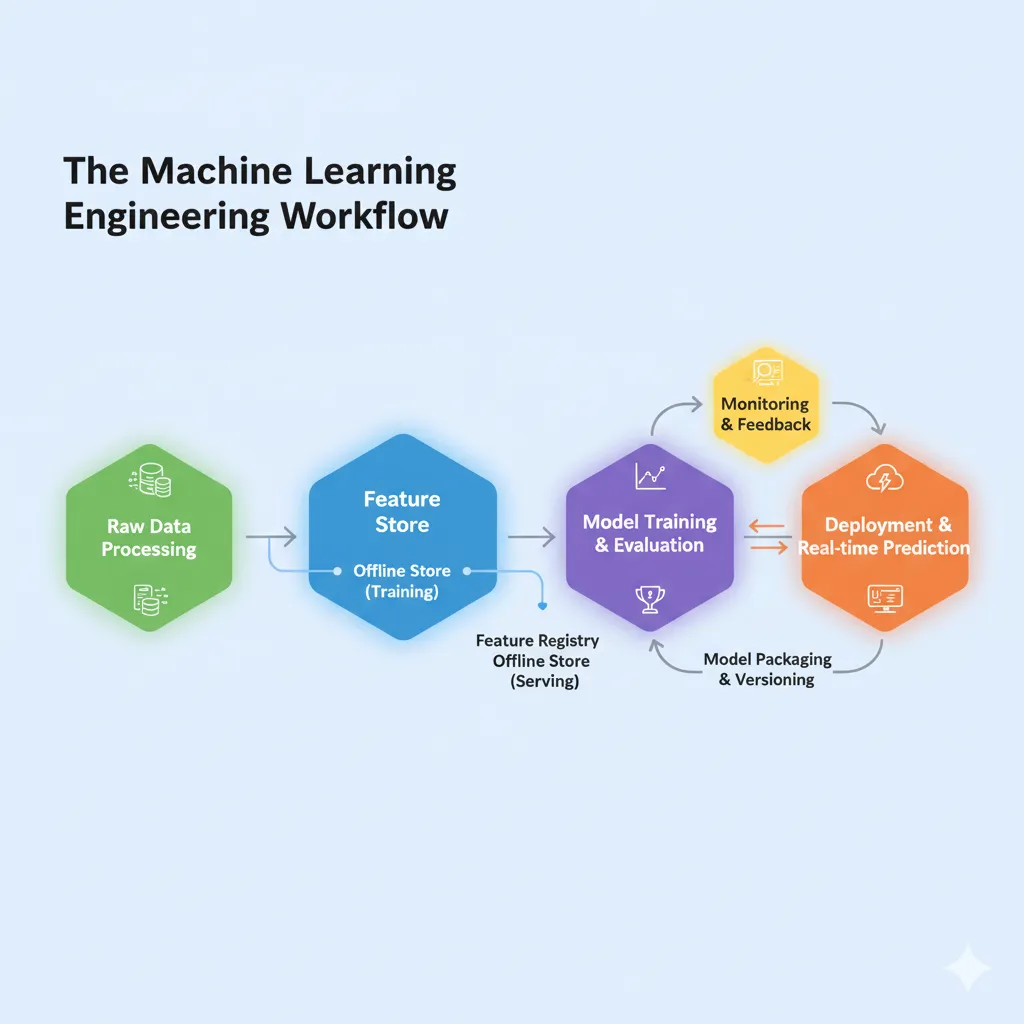
Most feature stores work the same way: one is good for training and the other is good for serving.
The offline store is where you keep your old data. You need a lot of data to train models, and it often goes back months or years. This store could be in your data warehouse and hold terabytes of feature values. Throughput is more important than speed here. You’re working with millions of rows to make training datasets.
The store on the internet is very different. It has to be very fast because it serves features to live apps that make decisions in real time. We’re talking about latencies in the single digits of milliseconds. It only keeps the most recent values for each feature and makes them easy to find.
The beauty? You keep features in one place, and the feature store automatically updates both stores with them.
Point-in-Time Correctness: The Secret Sauce
This is honestly one of the best (and most useful) things about modern feature stores.
When you’re building training data, you need to be extremely careful about data leakage. It’s cheating to use information from the future to guess the past. This makes your model useless in production.
When you make a training example for an event at time T, point-in-time correctness makes sure that you only use feature values that were there at or before time T.
For instance, if you want to know if a customer will leave on January 15th, you can only use features that were calculated up to that date. You can’t use features from January 20th, even though that data is in your database.
Feature stores do this automatically by using special “as-of” joins that go back in time to get the right feature values. No more messing with timestamps by hand, and no more data leaks by accident.
The Feature Store Ecosystem: What You Can Do
The market for feature stores is growing quickly. The global market was worth $1.2 billion in 2024 and is expected to reach $8.7 billion by 2033, which is a 24.5% increase each year.
Let’s look at your choices:
Feast: Open Source
Feast is the best open-source feature store, and for good reason. Gojek and Google made it at first, but now it’s a Linux Foundation project with people from companies like Shopify, Netflix, and Uber working on it.
Feast is great because it is so flexible. It doesn’t care what kind of infrastructure you have. You can use BigQuery, Redshift, or Snowflake for offline storage and Redis, DynamoDB, or Postgres for online serving. Instead of rebuilding everything, you just plug it into your existing stack.
What’s the catch? You have to run and keep it up yourself, which means you need engineering resources. But for teams with good infrastructure skills, it’s a great option that doesn’t lock them into a vendor.
SageMaker, Vertex AI, and Databricks are all cloud platforms.
Amazon SageMaker Feature Store works perfectly with the rest of the SageMaker ecosystem if you’re already using AWS. It works with both online and offline stores, lets you stream data into it, and makes it super easy to make training datasets that are correct at the right time.
Like BigQuery and other GCP services, Google’s Vertex AI Feature Store is also connected to them. BigQuery is what makes the new version work, which means you’re using Google’s data warehouse infrastructure to manage features.
If you work with Spark or Delta Lake, the Databricks Feature Store (which is now part of Unity Catalog) is perfect for you. It works well with MLflow for keeping track of experiments and makes it easy to keep track of feature lineage.
These managed options cost more, but they save you a lot of time and effort. No infrastructure to keep up, automatic scaling, and built-in monitoring.
Tecton and Hopsworks are two commercial options.
Companies like Tecton, which was started by the Uber engineers who made the first feature store, offer enterprise-grade solutions with advanced features like real-time feature transformations and advanced monitoring.
These aren’t cheap, but if you have a lot of models in production and are using ML on a large scale, the return on investment can be very good. You get professional help, advanced features, and tools made just for operational ML.
Common Mistakes (And How to Avoid Them)
Let’s talk about where teams go wrong when they set up feature stores.
Starting too big
What’s the biggest mistake? Trying to move everything at once. You don’t have to move all 500 features from your old systems on the first day.
Begin with a small amount. Choose one model that has a big effect, move its features to the store, and show that the idea works. Get to know the quirks, figure out how to do things, and then slowly grow. Don’t think of it as moving mountains; think of it as building a base.
Not Paying Attention to Data Quality
A feature store won’t magically fix data that isn’t good. Your features will be flaky too if your upstream data pipelines are flaky.
You need to keep an eye on things and check for quality at every step. Set up alerts for when values are missing, distributions are unexpected, or the schema changes. Your data observability strategy should include the feature store, not be separate from it.
Too much engineering for real time
Not all models need to have real-time features. Really.
You don’t need online serving with a latency of less than a millisecond if your model only makes predictions once a day. It’s fine to have an offline store that only sells in batches. Don’t make your infrastructure more complicated than it needs to be. It’s costly and hard to keep up.
Be honest about how much latency you need. A recommendation system that shows products when the page loads? Yes, you need it right away. A model that can guess how much money a customer will spend over their lifetime on monthly marketing campaigns? Batch is okay.
The question that never goes away: build or buy?
This decision keeps engineering leaders up at night.
The Do-It-Yourself Way
Companies such as Uber, DoorDash, Netflix, and Wix made their own feature stores. They had a lot of specific needs, a lot of people, and a lot of engineering talent.
You have full control and can make changes when you build your own. You can get the most out of your specific use case, connect deeply with your current systems, and avoid paying for vendor services.
But here’s the truth: it takes a dedicated team months, sometimes even years, to build and keep up. You’re basically taking on a whole new product to support. This might not be the best way to use your engineering resources unless you’re running ML on a huge scale with special needs.
The Buy Path
Getting a managed solution (whether it’s cloud-native or commercial) will get you up and running faster. You’re using infrastructure that has been tested in battle, getting automatic updates, and letting your team focus on real ML problems instead of the internals of the feature store.
What are the trade-offs? Cost (obviously) and a little less freedom. You’re working within the limits of the platform. But for most businesses, especially those that don’t have big ML teams, this is the best choice.
The Mixed Approach
A lot of teams use Feast as a middle ground. You don’t have to pay for a license because it’s open source, but you still get a strong base without having to start from scratch. You make changes as needed and rely on the community for best practices.
If you have two or three engineers who can take care of the feature store but don’t want to start from scratch, this works well.
The Future: Where Feature Stores Are Going
The space for feature stores is changing quickly. Here is what’s next:
Automated Feature Engineering
More and more feature stores are working with automated feature engineering tools. Instead of making features by hand, you give AI raw data and target variables, and it will suggest or even make useful features on its own.
This could cut down on the time data scientists spend on feature engineering by a lot, allowing them to focus on model architecture and business problems.
More Help for Unstructured Data
Most feature stores today only work with structured, tabular data. But AI will use pictures, words, and videos in the future. We’re starting to see feature stores that can handle embeddings from large language models and vision transformers as first-class features.
Think of a feature store that knows that “price” and “category” are just two more features, just like an image of a product from CLIP.
More tightly integrated GenAI
Feature stores are changing because of the rise of generative AI and retrieval-augmented generation (RAG). Some are adding vector search features to provide embeddings for semantic similarity.
This connects traditional ML, which uses tables, with modern LLM-based apps, which use a lot of embeddings in their architectures.
Better Observability
ML-native observability will be built into future feature stores. The platform has built-in features like automatic drift detection, tracking feature importance, and suggestions for refreshing features.
Before your model performance goes down, you’ll get alerts like “Hey, this feature’s distribution has changed a lot in the last week—check it out.”
Your Action Plan for Getting Started
Are you sure you need a feature store? Here’s how to get started without making your team feel overwhelmed.
Step 1: Check Your Features
Know what you have before you do anything. Make a spreadsheet that shows all the features that are currently in production, how they are calculated, how they are served, and which models use them.
You’ll probably find a lot of things that are the same (three teams calculating “user activity score” in slightly different ways) and features that no one knows why they exist. This audit is your guide.
Step 2: Choose Your Pilot
Don’t start with your hardest model. Choose something that is important but not too hard to handle. For example, 20 to 30 features that 1 or 2 models use.
Good candidates are models that already have problems with training and serving or that need a lot of time for feature engineering.
Step 3: Pick Your Tech
Choose a method based on your audit and pilot:
Are you already using SageMaker on AWS? Start with the SageMaker Feature Store.
Do you use Google Cloud a lot? Vertex AI Feature Store is here to help you.
Investing a lot in Spark/Databricks? Their feature store works perfectly with other systems.
Want to avoid being locked in or need the most flexibility? Feast is worth the money spent on engineering.
Don’t think too much about it. Choose something and go on. You can always move later if you need to.
Step 4: Set Standards for Features
Make rules for how to name, document, and version features. This may sound boring, but it’s very important for adoption.
Bad: feat_1, user_score_v2_final_actually_final
User_avg_purchase_amount_30d and merchant_fraud_risk_score_v3 are both good.
Write down what each feature means, how it’s calculated, and any problems that might come up. You and your teammates will be grateful in the future.
Step 5: Measure and Repeat
Keep track of important metrics, like how long it takes to add new features. How often do models get skewed between training and serving? How much duplicate feature engineering is there?
These numbers should get better after your pilot. Use them to explain why the feature store should be able to hold more models and features.
The Bottom Line
Feature stores aren’t magic, but they do fix real problems that every ML team has to deal with.
A feature store can help if you are always having problems with training-serving inconsistencies, spending weeks recreating features, or trying to keep model performance up in production.
The market agrees: companies are spending billions on feature store technology because it works. Teams are seeing faster development cycles, better model performance, and easier MLOps, from small businesses to big ones like Uber, Netflix, and DoorDash.
Start with small steps, choose the right tool for your needs, and work on your biggest problems first. You don’t need to boil the ocean; just moving one model’s features can show a lot of value.
Better algorithms and more data can help, but they aren’t the key to consistent AI performance. It’s making sure that the features you use to train your models are always reliable, reusable, and the same no matter where you use them.
That’s what feature stores are for. And that’s why they are becoming an important part of any serious ML team’s infrastructure.
FAQ’s
1. Do I need a feature store if I’m new to machine learning?
Not right away, though. If you only have one or two models and a small team, you can use simpler solutions. A feature store makes sense when you have three or more models in production or more than one person working on features. The pain of not being consistent gets worse as you get bigger.
2. What makes a feature store different from a data warehouse?
Data warehouses store raw business data—transactions, user records, events. Feature stores keep features that have been changed and are ready for machine learning that come from that data. They are better for ML workloads (low-latency serving, point-in-time correctness) than for business intelligence queries. You can think of them as working together: your warehouse feeds your feature store.
3. How long does it usually take to see a return on investment (ROI) from setting up a feature store?
Most teams start to see benefits 2–3 months after they put their first model in a feature store. You can see that the time it takes to do feature engineering has gone down right away. The bigger wins, like better model performance from consistency and faster time-to-production for new models, build up over 6 to 12 months. Companies say that their ML teams are 30–40% more productive.
4. Can feature stores handle features that need to be calculated in real time?
Yes! Modern feature stores allow for real-time changes to features. When a store gets a request for a prediction, it can get recent raw data, make changes to it, and serve the computed features in just a few milliseconds. This is very important for things like fraud detection, where you need information about events that are happening right now.
5. How do feature stores deal with versioning features and making them work with older versions?
A good feature store keeps track of the history of each feature’s versions. When you change the logic of a feature, the old version stays available so that models that already exist can still work. You can try out new versions in “shadow mode” before putting them into production. This lets you change features without breaking models that are already in use, which is a big benefit over managing features by hand.


Pingback: A Beginner's Guide to Docker for Data Science: Putting AI in Powerful Containers - Bing Info