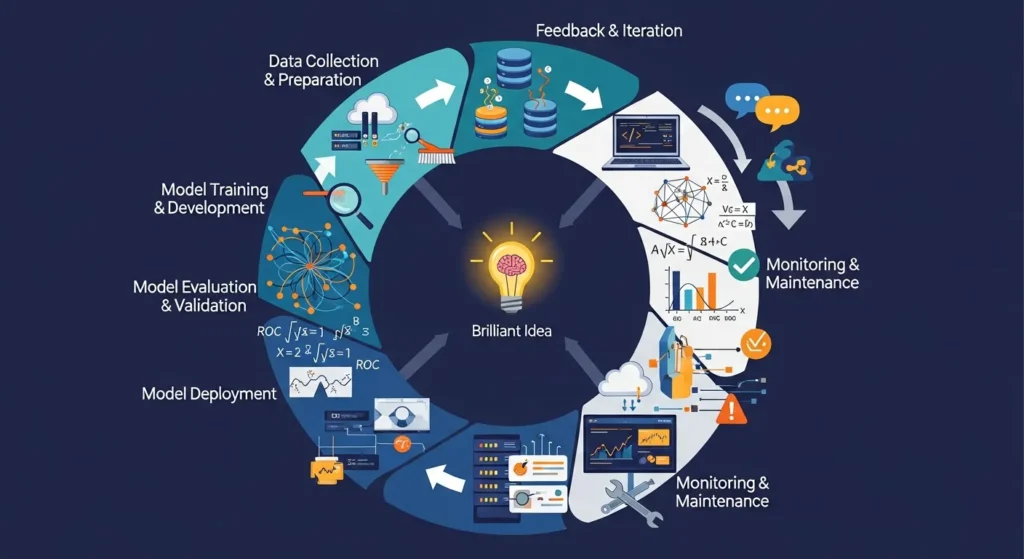
The ML Lifecycle: From Idea to Deployment and Beyond
Remember the last time you got a great movie suggestion on Netflix or when your phone’s camera knew exactly where to focus? That’s how machine learning works behind the scenes. But here’s the thing: those smart features didn’t just show up out of nowhere. Today, we’re going to talk about the journey they went on, which was pretty intense.
People don’t just use the term “ML lifecycle” as a techy buzzword. The actual roadmap takes a simple idea like “hey, wouldn’t it be cool if we could predict customer churn?” and turns it into a working model that makes decisions in the real world. And to be honest? People only see the shiny end result, but the real magic happens along the way.
In this post, you’ll learn everything about the process, from that first lightbulb moment to putting your model into use and what happens next (spoiler: it never really ends). We’ll go over each step, give you some real-world examples, and talk about the problems you’ll run into. You’ll know how ML projects work in real life, not just in theory, by the time you’re done.
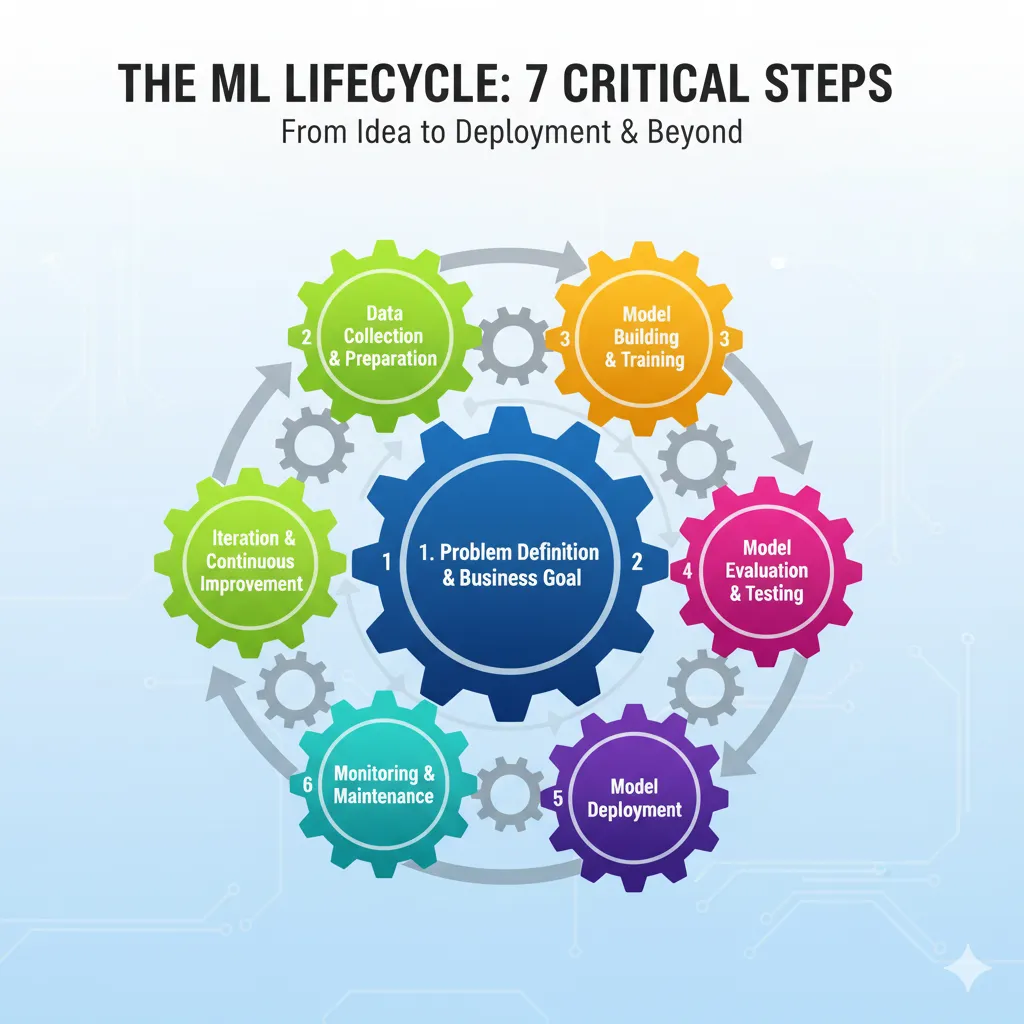
Seven important steps in the machine learning lifecycle shown as gears that are connected to each other
What Is the ML Lifecycle?
Let’s get started. The ML lifecycle is the whole process that a machine learning model goes through, from beginning to end and beyond. It’s not something you do once and forget about. It’s more like taking care of a plant. You can’t just throw seeds in the ground and leave them there. You have to water it, make sure it gets enough sunlight, cut off the dead leaves, and check on it often to make sure it’s healthy.
The ML lifecycle includes everything, from figuring out what problem you’re trying to solve to planning how to solve it, gathering and preparing your data, building and training your model, putting it into production, and then keeping an eye on it and making it better. Each step builds on the one before it, and sometimes you have to go back to the beginning when things go wrong.
What sets ML apart from regular software development? Well, with regular software, once you write the code and it works, you’re pretty much done. But what about ML? Because the world keeps changing, your model needs to keep learning and changing. Customer behavior changes, new trends come up, and all of a sudden, that model you trained six months ago isn’t working as well as it used to.
Step 1: Figure out what the problem is and what the business goal is.
Okay, this is where it all begins, and it’s probably the part that gets the least attention. It’s surprising how many teams start building models without really thinking about what they’re trying to solve. A big mistake.
Putting the Problem in the Right Light
You need to ask yourself, “What’s the real business problem here?” before you even think about data or algorithms. The business problem, not the ML problem. It’s not a problem to say, “We want to use machine learning.” But saying, “We’re losing 20% of our customers every quarter and need to figure out who’s likely to leave so we can do something about it” is a real problem that needs to be solved.
Here’s the trick: make sure that everyone, not just the data science team, can understand it. Your stakeholders and business people all need to understand it. And the problem should be one that ML can really help with. A simple rule-based system or even better analytics can sometimes do the trick.
Setting Success Metrics
Once you know what your problem is, you need to know what success looks like. Is it about making things more accurate? Getting rid of false positives? Save money? No matter what it is, you should be able to measure it and connect it to business results. You can’t improve something if you can’t measure it, and you definitely can’t show your bosses that it’s worth the money.
Think about whether you’re working with classification, regression, clustering, or something else entirely. Are you trying to guess categories, like spam or not spam, or continuous values, like the price of a house? This sets the stage for everything else.
Step 2: Collecting and Getting Ready the Data
Okay, now we’re really getting down to business. Machine learning runs on data, and if your data is dirty or low-quality, your model will sputter and die.
Where do you get your data?
You can get data from a lot of different places, like internal databases, third-party vendors, APIs, sensors, user-generated content, web scraping, and more. Finding trustworthy sources that really give you what you need is the most important thing. And yes, sometimes the data you need isn’t available yet, so you have to go out and make it.
People don’t talk about this enough: having a variety of data is important. Your model will be biased and not work well for everyone else if your training data only includes one group of users. Make sure you see the whole picture.
Cleaning and Getting Ready
Data that hasn’t been cleaned up is messy. Like, really, really messy. There will be missing values, duplicates, outliers, inconsistencies, and all sorts of other problems. That’s all done during data preprocessing. You will clean it up, make sure the formats are the same, deal with any missing values (maybe by filling them in or getting rid of them), and get everything into a shape that your model can use.
This step can take up to 60–80% of your time on an ML project, and that’s normal. Don’t hurry it. A model that was trained on bad data is worse than not having a model at all.
Feature Engineering: The Secret Sauce
This is where things get interesting. Feature engineering is the process of making new variables from your current data to help your model learn better patterns. For instance, if you have a dataset with dates, you could get features like the day of the week, the month, or whether it’s a holiday. These engineered features can make your model work a lot better.
You can change features (like turning categorical variables into numbers), make new ones (like figuring out how much profit you make from revenue and cost), pick the most important ones, and even lower the number of dimensions to make things work better. It’s a mix of art and science, and you need to know a lot about your field.
Stage 3: Making and training the model
We’re getting there now. Most people think of this stage when they hear “machine learning.” It’s when you actually build and train the model.
Finding the Right Algorithm
There are a lot of algorithms out there, like linear regression, decision trees, random forests, and neural networks. The type of problem you’re trying to solve, the size and type of your data, and what you’re trying to improve all play a role in choosing the right one. Start with something easy. For real. If a simpler model will work just as well, don’t go straight to a complicated deep learning architecture.
It’s easier to debug, train, and get something working from start to finish quickly when you start simple. You can try out more complicated methods once you have a baseline.
Teaching the Model
Training is the process by which your model learns from the data. You give it your training data, and it changes its internal settings to make mistakes less likely. Depending on how complicated the model is and how much data there is, this process can take anywhere from a few minutes to a few days.
When you train, you’ll divide your data into sets for training, validation, and sometimes testing. The model learns from the training set, the validation set helps you adjust hyperparameters and avoid overfitting, and the test set tells you how well the model generalizes.
Tuning Hyperparameters
Before training starts, you set hyperparameters like the learning rate, the number of layers in a neural network, or the depth of a decision tree. Making changes to these can have a big effect on how well they work.
You can do this by hand, which is boring and takes a lot of time, or you can use automated methods like grid search or random search. Bayesian optimization and other more advanced methods can find good hyperparameters more quickly. The goal is to find the right balance between your model doing well on new data and not overfitting to the training data.
Stage 4: Check and Test the Model
Your model might train, but that doesn’t mean it’s good. You have to test it very carefully to make sure it works.
Important Numbers to Keep an Eye On
The metrics that matter to you depend on the issue at hand. You could use accuracy, precision, recall, F1 score, or AUC-ROC to classify things. You would use metrics like MAE (Mean Absolute Error), MSE (Mean Squared Error), or RMSE for regression.
But here’s the thing: accuracy by itself can be misleading, especially when the datasets aren’t balanced. Think about how you would predict fraud if only 1% of transactions were. A model that always says “not fraud” would be 99% accurate but not very useful. That’s why you should check your precision (how many of your correct predictions were right) and recall (how many of the actual positives you caught).
Testing and Cross-Validation
Cross-validation tests your model on different parts of your data to give you a more accurate picture of how well it works. It’s like getting a second, third, or fifth opinion to make sure your results aren’t just a fluke.
Finally, put your model through its paces with data it has never seen before, either during training or validation. This is the real test to see if it can apply to other situations.
Stage 5: Putting the Model into Use
Your model is trained, tested, and ready to use. Now is the time to put it into production, where real users and real data will be able to use it.
Deployment Plans
There are a number of ways to deploy models, and each has its pros and cons. Let’s look at the most common ones:
Blue-Green Deployment means that you have two identical production environments. You put the new model in the “green” environment, and the “blue” environment runs the current version. You switch all traffic over once you’ve tested green and it looks good. If something goes wrong, you can switch back right away. This method cuts down on downtime and makes rollbacks very simple, but it needs twice as much infrastructure.
Canary Deployment: Instead of switching everyone over at once, you give the new model to a small group of users first—like 5%—and watch how it works. You slowly raise the percentage until everyone is using the new model if everything looks good. This lowers the risk because issues only affect a small group at first, but it’s harder to put into action and needs advanced traffic routing.
You run two versions of the model at the same time and look at how they do with real user data. This helps you choose the right model based on the data.
Shadow Deployment: The new model runs next to the old one, but its predictions aren’t used yet. You can safely see how it works in the real world by comparing its outputs to those of the current model.
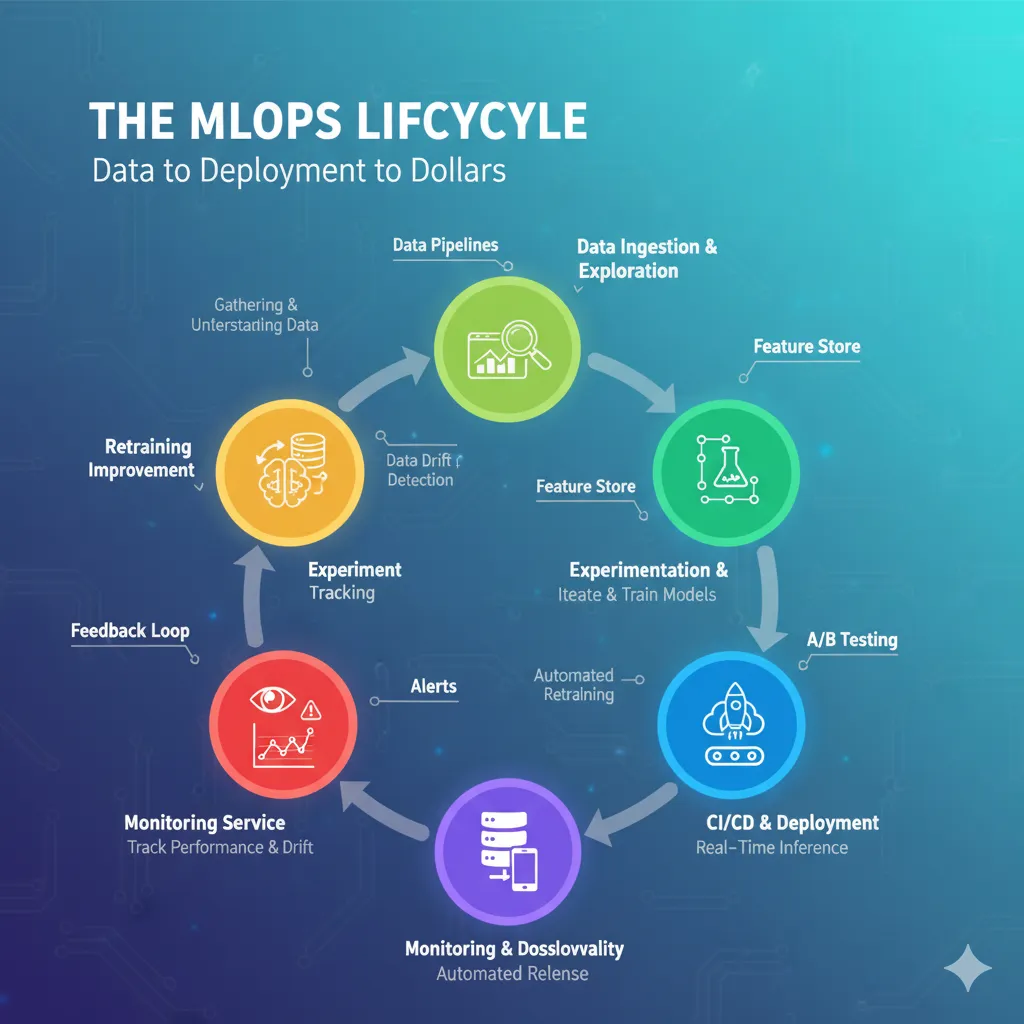
This diagram shows the different stages of the MLOps lifecycle, from analyzing data to experimenting, building models, deploying them, and keeping an eye on them.
Orchestration and containerization
Containerization, like Docker, is what most teams use to put their models and all of their dependencies together. This makes deployment the same in all environments. What works on your laptop will also work in production. Kubernetes is often used to manage these containers, making sure they can grow, balance the load, and keep your model running.
Stage 6: Keeping an eye on things and taking care of them
Putting your model into use isn’t the end; it’s the start of a whole new phase. You need to keep a close eye on your model once it’s in production.
Why Keeping an Eye on Things Is Important
Models can get worse over time, and there are a few reasons for this. First, there’s data drift, which happens when the statistical properties of your input data change. Customer behavior may change, new products may come out, or a pandemic may change everything. When the input data is different from what the model learned from, it doesn’t work as well.
Then there’s concept drift, which is when the link between inputs and outputs changes. For instance, what made someone a good credit risk before a recession may not be true after. The model learned patterns that are no longer true.
What to Keep an Eye On
You should be keeping an eye on a few things:
Are the model performance metrics, like accuracy, precision, and others, staying the same?
Data quality: Are you getting values that are missing, formats that are unexpected, or outliers?
Prediction distribution: Has the way your model’s predictions are spread out changed?
Latency and throughput: Is the model fast enough to respond?
Resource usage: Is it using too much memory, CPU, or storage?
Arize AI, WhyLabs, Fiddler, Neptune, and Evidently are some good monitoring tools that can help with a lot of this. They can let you know when something goes wrong so you can fix it before it affects users.
Ways to retrain models
You will need to retrain your model with new data when it starts to break down. There are a few ways to do this:
Retraining on a regular basis: Set a schedule for retraining, such as once a week, once a month, or whatever works best for your situation. If your data changes often and you have a good idea of how often drift happens, this works well.
Triggers Based on Performance: Set a limit for what is considered good performance. When your model falls below it, retraining should happen automatically. This is more responsive, but you need to keep an eye on it.
Data Change Triggers: Retrain whenever there are big changes in how data is spread out. This catches drift early on, before performance drops.
On-Demand Retraining: Sometimes you have to retrain yourself when you know something big has changed, like when your business changes direction or you launch a new product.
Another question is how much data to use for retraining. You can use a fixed window (like the last 12 months), a dynamic window (try out different amounts to see what works best), or a representative subsample that is similar to the data you have now.
Stage 7: Iteration and Continuous Improvement
The truth is that the ML lifecycle never really ends. It’s a never-ending cycle of getting better.
CI/CD for learning machines
CI/CD practices can help you work more efficiently with machine learning, just like they do in software engineering. Set up automatic testing for your model training, data pipelines, and deployment processes. This way, you can automatically check and deploy changes every time you change your code, data, or model.
You can use GitHub Actions, CircleCI, DVC, and CML to set up CI/CD for ML. The goal is to find problems early, speed up deployment, and keep quality high through automation.
Making Different Versions of Everything
You need to version not only your code, but also your data, models, configurations, and even your experiments in ML. Why? Because it is very important to be able to reproduce results. You need to know exactly what version of the data, code, and hyperparameters were used to train a model if it starts acting strangely in production.
DVC, MLflow, and lakeFS are some of the tools that can help with versioning data and models. Set clear rules for naming things and automate versioning as much as you can.
Important Problems in the ML Lifecycle
Let’s be honest: this isn’t easy. You’re going to face problems, and it’s best to know what they are ahead of time.
Quality and Availability of Data
It’s hard to get enough good, labeled data. It costs a lot of money and takes a lot of time, and sometimes the data you need isn’t even there yet. Biased data makes biased models, which can have big effects.
Managing resources and scalability
Training complicated models, especially deep learning ones, takes a lot of computer power. It all costs money: GPUs, cloud infrastructure, and distributed computing. It’s always hard to find a balance between performance and cost.
How to Understand Models
A lot of advanced models, especially deep neural networks, are black boxes. You can tell them what you think, but it’s not easy to explain why. That’s a big problem in industries that are heavily regulated, like healthcare and finance. You need to be able to explain things, which often means picking models that are easier to understand.
Things to Think About Ethically
ML models can make biases in training data worse and keep them going. There are real problems with facial recognition systems that work better on lighter skin tones, hiring algorithms that discriminate, and credit scoring that isn’t fair. It takes a lot of work to build ML systems that are fair, open, and accountable.
Problems with production
Getting models into production is one thing; making sure they keep working is another. You have to deal with model drift, problems with data quality in production, latency requirements, making sure everything works with existing systems, and keeping an eye on everything all the time. It takes up all of your time.
MLOps: The Thing That Holds Everything Together
MLOps, which stands for Machine Learning Operations, is just DevOps for ML. It’s the group of tools and methods that help you run the whole ML lifecycle well.
MLOps is a way for data engineers, data scientists, ML engineers, and DevOps people to work together to build, deploy, and keep ML systems running on a large scale. It focuses on automation, monitoring, reproducibility, and making things better all the time.
AWS SageMaker, Databricks, Google Vertex AI, Kubeflow, MLflow, Metaflow, and many more are some of the most popular MLOps platforms and tools. They take care of different parts of the lifecycle, like keeping track of experiments, setting up pipelines, deploying models, and keeping an eye on performance.
The tools you choose will depend on your team’s skills, your budget, your infrastructure, and the specific task at hand. Some teams like platforms that do everything, while others use a mix of different tools.
Putting It All Together in the Real World
Let’s look at a quick example to see how everything fits together.
Think about how you would build a recommendation engine if you worked for an online store. This is how you would go through the lifecycle:
Problem Definition: Set the goal, which is to make more money by showing users products they are likely to buy. Success metric: a 10% rise in the click-through rate and a 5% rise in the conversion rate.
Data Collection: Get information about the user’s browsing history, purchase history, product metadata, and demographics. Make the data clean and ready to use, and deal with any missing values.
Feature Engineering: Make features like “average time spent on product page,” “products viewed in the same session,” “users who bought this also bought,” and so on.
Model Development: Begin with a basic method of collaborative filtering. Train, test, and fine-tune hyperparameters. Try out more complicated models, such as matrix factorization or deep learning.
Test on a holdout set for evaluation. In offline tests, check precision@k, recall@k, and business metrics.
Deployment: Use canary deployment and start with 5% of users. Keep an eye on click-through rates, conversion rates, and latency. If it works, slowly raise it to 100%.
Monitoring: Check the model’s performance every day. Set up alerts for when the CTR goes down or the latency goes up. Keep an eye on data drift. Are users suddenly looking at very different products?
Retraining: Every week, use the most recent user behavior data to retrain. Keep changing features and model architecture based on how well they work.
That’s the lifecycle in action: it’s messy, it goes on and on, and it keeps going.
Best Ways to Make an ML Lifecycle Work
Here are some tried-and-true best practices before we finish:
Don’t make things too hard; start with the basics. Start with a basic model and baseline. From there, keep going.
Automate everything, including data pipelines, training, testing, deployment, and monitoring. Manual processes don’t grow.
Version everything, including code, data, models, and settings. You will thank yourself in the future.
Don’t just deploy and forget; keep an eye on it. Watch performance, data quality, and drift closely.
Work together with other teams: ML isn’t just a problem for data science. It needs people from engineering, product, and business to work together.
Put ethics first: Make sure your systems are fair, open, and accountable from the start.
Try new things: Keep track of your experiments, compare the results, and learn from your mistakes.
Write down everything: Good documentation makes it easier to fix bugs, get new employees up to speed, and follow the rules.
In conclusion, the journey never ends.
That’s it! You’ve seen the whole ML lifecycle, from idea to deployment and beyond. It’s not a straight path. It’s a loop, a cycle, a never-ending process of building, deploying, monitoring, learning, and getting better.
The truth is that using machine learning in production is hard. Building a model that does well on a test set isn’t enough. It’s about making a system that works well in the real world, can change when it needs to, and gives the business real value. It’s about data pipelines, deployment plans, monitoring tools, retraining schedules, and moral issues.
But when you do it right? When you see your model making good predictions, helping users, and driving better decisions? That’s when all the hard work pays off.
Keep in mind that the best ML teams don’t have the most complicated algorithms. They are the ones who know the whole lifecycle, follow best practices, work well with others, and never stop learning. So use what you’ve learned here on your projects and keep making changes. The ML lifecycle is a journey, not a goal, and that’s what makes it so exciting.
FAQ’s
In machine learning, what is the difference between concept drift and data drift?
When the statistical properties of your input data change over time, like when customer demographics change or new product categories are added, this is called data drift. Your model is looking at data that is different from what it was trained on. On the other hand, concept drift happens when the link between inputs and outputs changes. For instance, the things that made someone a good loan candidate before a recession might not be the same after. Both of these things make model performance worse, but they need different fixes. You may only need to retrain your model with new data if it drifts. If it drifts in terms of concept, you may need to rethink your whole model approach.
How often do I need to retrain my machine learning model while it’s in use?
It depends on how you plan to use it; there is no one-size-fits-all answer. You might need to retrain every day or every week for fraud detection or recommendation systems where user behavior changes quickly. For models that use more stable data, like quality control in manufacturing, once a month or once a quarter might be enough.
What are the differences between the blue-green and canary deployment strategies?
Blue-green deployment keeps two identical production environments: one that is active (blue) and one that is not (green). You put the new model on green, test it, and then switch all traffic over right away. It takes just as long to switch back if there is a problem. It’s easy and low-risk to roll back, but it needs twice as much infrastructure. Canary deployment slowly gives the new model to a small number of users at first, like 5%, and then slowly adds more users if everything goes well.
What makes feature engineering so important in machine learning?
Feature engineering is often what makes a model go from being okay to being great. Data that hasn’t been processed is not usually in a form that’s best for learning. You can help your model understand patterns better by adding new features, such as getting the day of the week from a date, figuring out ratios between variables, or combining related attributes. Switching to a more complicated algorithm may not help as much as good feature engineering.
It takes creativity and knowledge of the field, but the rewards are great. Many data scientists actually spend more time on feature engineering than on model selection because it makes such a big difference.
What are the most important moral issues in machine learning, and how can I deal with them?
The most important ethical issues are bias and fairness, privacy and data security, transparency and explainability, and being responsible. When training data is biased, models are also biased. For example, facial recognition systems that don’t work well for people with darker skin tones are biased. To fix this, use datasets that are diverse and representative, test your models for bias thoroughly, and add fairness constraints to them. Use strong encryption, anonymization, and following rules like GDPR to keep users’ privacy safe..


Pingback: Version Control for Machine Learning: Managing Data, Code, and Models with DVC - Bing Info
Pingback: Why Data Is More Important Than Your AI Model - Bing Info
Pingback: Building a Scalable and Intelligent Real-Time Inference System with FastAPI - Bing Info