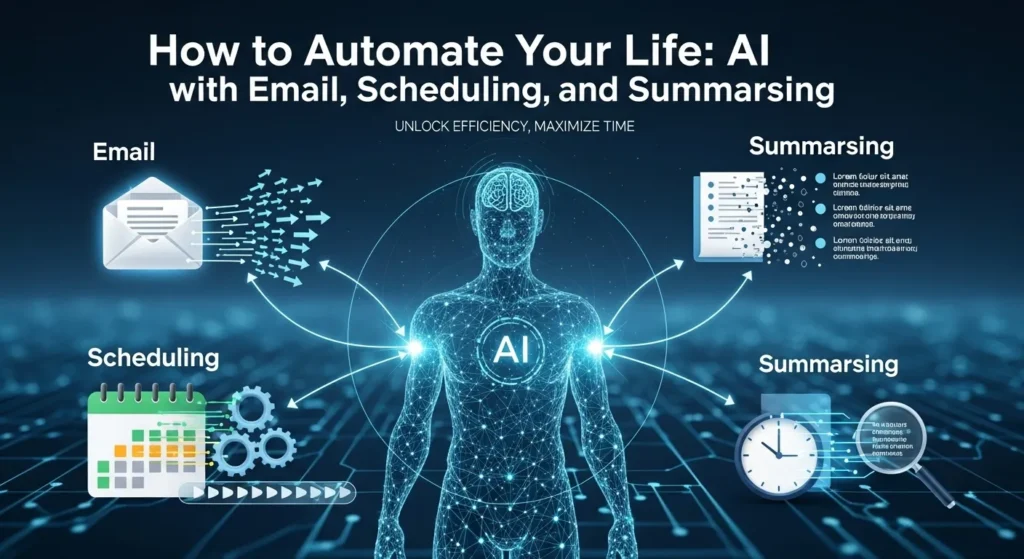
Introducing to How to Automate Your Life: AI with Email, Scheduling, and Summarising.
Imagine the following: You wake up in the morning on Monday and get 47 emails in your inbox. There are three meeting requests that should be answered. There are two documents which should be reviewed and summarized. Your schedule is a mash-up of conflicting engagements. When you are finished manually sorting stuff out, it is already lunch time and you are not even on to your actual work.
Sound familiar? You’re not alone. The daily time spent by the average knowledge worker in dealing with emails is 2.5 hours a day. That is more than 12 hours a week—almost an entire workday wasted in inbox madness.
But what if I informed you there was an option of regaining those hours? What would it harm to use AI to eliminate the boring stuff in order to concentrate on something really important? This post will discuss the ways that artificial intelligence can change your everyday workflow with smart email management, automated scheduling, and document summarization that happens in lightning time.
The Email Revolution: Your New Artificial Intelligence Assistant.
The reason why email management is more important than ever before.
Some truths about email: It is not going away. Slack, Teams, and a dozen other communication tools did not replace email, which is still the cornerstone of professional communication. It is not email but our approach to it that is the problem.
It is demonstrated that AI email administration applications can save consumers as much as 2 hours each day. That’s 10 hours per week. Consider what you will do with an additional 10 hours.
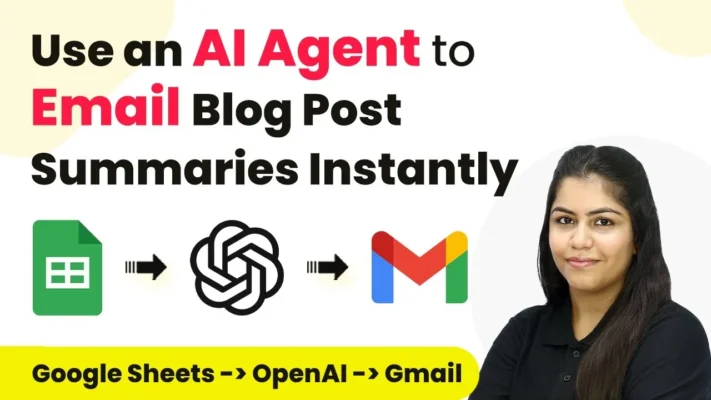
Applying AI to automate the emission of email summaries of blog posts on the basis of the Google Sheets in OpenAI to Gmail. Source: YouTube
SaneBox: Intelligent Email Sorter.
SaneBox is a personal assistant that does not sleep. This AI-based tool would not have to sort your emails manually, but instead learns your ways of doing things and will automatically sort your messages into various organised folders.
Here’s how it works:
SaneLater removes less significant emails off your inbox.
SaneBlackHole blocks forever unwanted senders.
SaneReminders reminds you about emails that you have not responded to.
SaneNews maintains newsletters and urgent messages as different.
The best part? SaneBox is compatible with any type of email company – Gmail, Outlook, Apple Mail, and so on. There is no necessity to change platforms and implement new interfaces.
Shortwave: The AI-Native Email Experience.
And in case you would like a more radical one, Shortwave is a reinvention of email in its core. This is not another email app that has been AI-enabled; it is an artificial intelligence-based app.
Key features include:
Search emails instantly with the help of AI.
Intelligent email packages combining connected messages.
Essay mill technology that is similar to your own writing.
AI-based automatic meeting scheduling.
One user referred to it as ChatGPT in your email. The artificial intelligence assistant can process complicated commands such as “Book an appointment with the marketing team next week” or “Overview this email thread and point out actionables.”
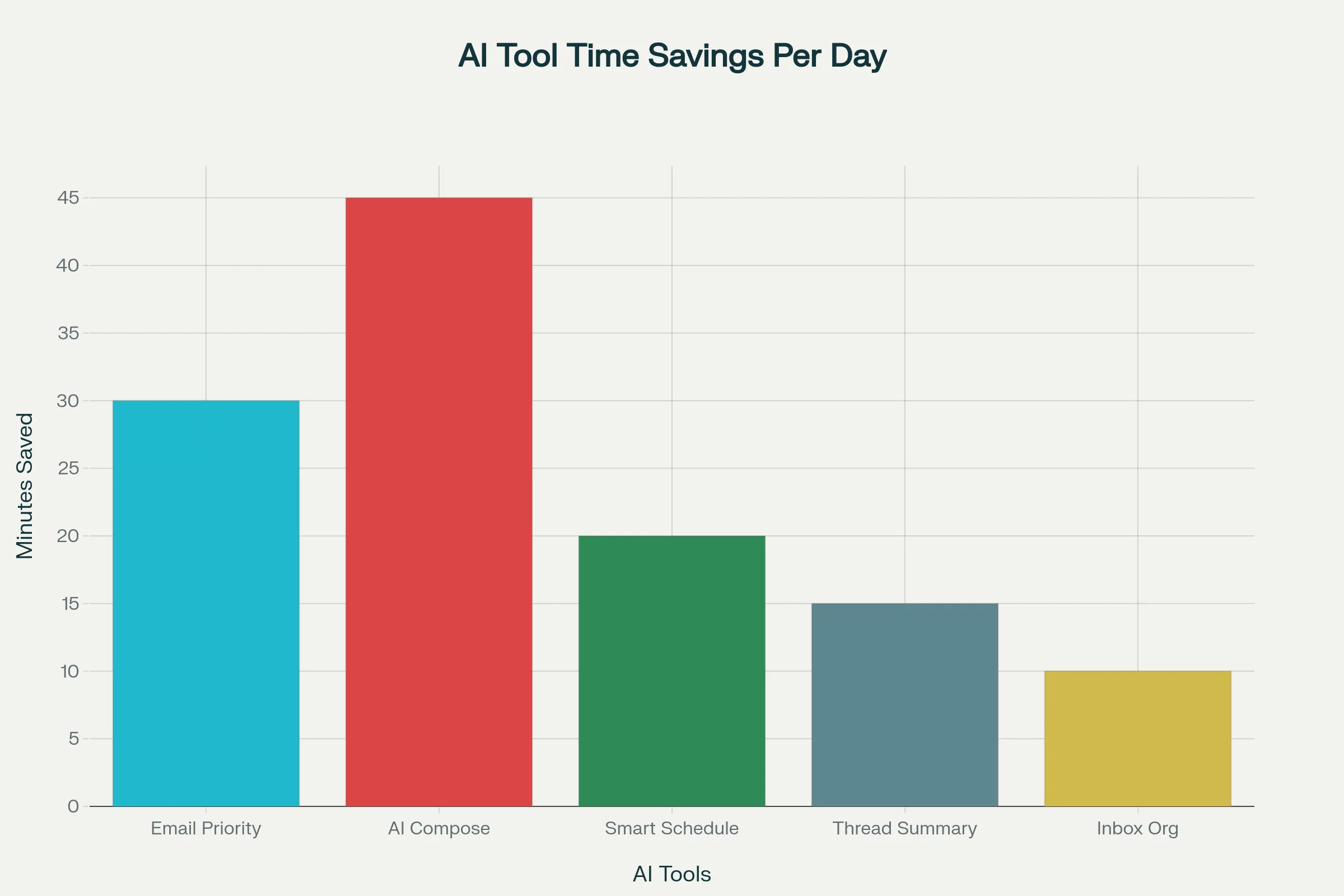 Artificial Intelligence (AI) Email Time Savings per day.Source: Amazonaws
Free AI Email writing Tools that actually work.
Unwilling to spend on high-quality equipment? Even a few free alternatives can make your email game:
The AI Email Writer is an email generator that produces professional emails immediately by QuillBot. All you have to do is to say what you require, and it will make you a draft looking just as polished as you desire.
The AI Features of Grammarly are more than the spell-check. The tool can compose whole emails, recommend the way to do it better and even make the tone correspond to the situation.
ChatGPT and Gemini are remarkably effective in writing emails. Design templates of usual answers, and tailor them on a case-by-case basis.
Scheduling madness to AI-Powered Scheduling Bliss.
The Scheduling Problem
What is the amount of time you waste on calendar tetris? Email exchanges in a bid to establish a meeting slot that would suit all parties. Dotting various calendars and addressing time zone issues.
AI scheduling applications eradicate all of this friction. You leave the whole coordination of schedules to artificial intelligence instead of performing it manually.
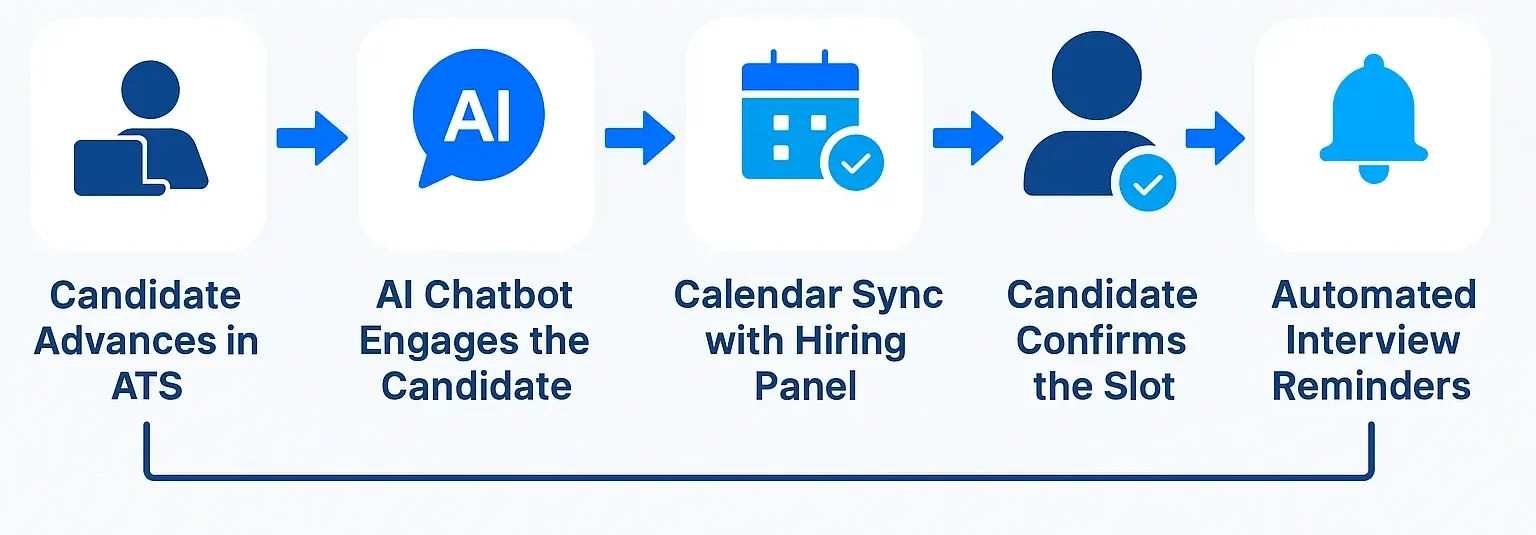
AI-based interview scheduling automates the interactions with the candidates, synchronisation of the calendar, and reminders to conserve recruiter time. Source: Cloudapper
Outlook Copilot by Microsoft.
Copilot also provides powerful scheduling capabilities, in case you are already using Outlook. The AI assistant can:
Produce invitations to a meeting based on natural language requests.
Discover the best time to meet with more than two people.
Automatically create meeting agendas.
Send follow-up reminders.
Sample prompt: Set a meeting with Sarah and Tom to review their progress quarterly within a month with travel time.
Reclaim.ai: The Calendar Optimiser.
Reclaim.ai goes one step further to protect your deep work time by ensuring that you schedule it in. The AI analyses your calendar patterns and automatically:
Blocks create time to work on significant projects.
Rescheduled meetings are made flexible upon conflict occurrence.
Associate’s personal and work schedules.
Makes your schedule more energy efficient.
Users claim that they save 7.5 hours per week with smart calendar management.
Clockwise: Team Scheduling Made Simple.
Clockwise provides AI-based coordination to teams that have issues with meeting overload. The platform:
Establishes teams with joint areas of focus.
Moves flexible meetings automatically to maximise the productivity of groups.
Data integrates with Google Calendar and Slack.
Offers an insight into patterns and productivity of meetings.
Document Summarisation: Through Information Overload to Clarity.
The Information Avalanche
We’re drowning in documents. Research reports, email conversations, meeting notes, articles on industry—there is too much to read and work on manually.
AI summarization applications eliminate the noise, reducing long documents to insights to be acted upon within seconds.
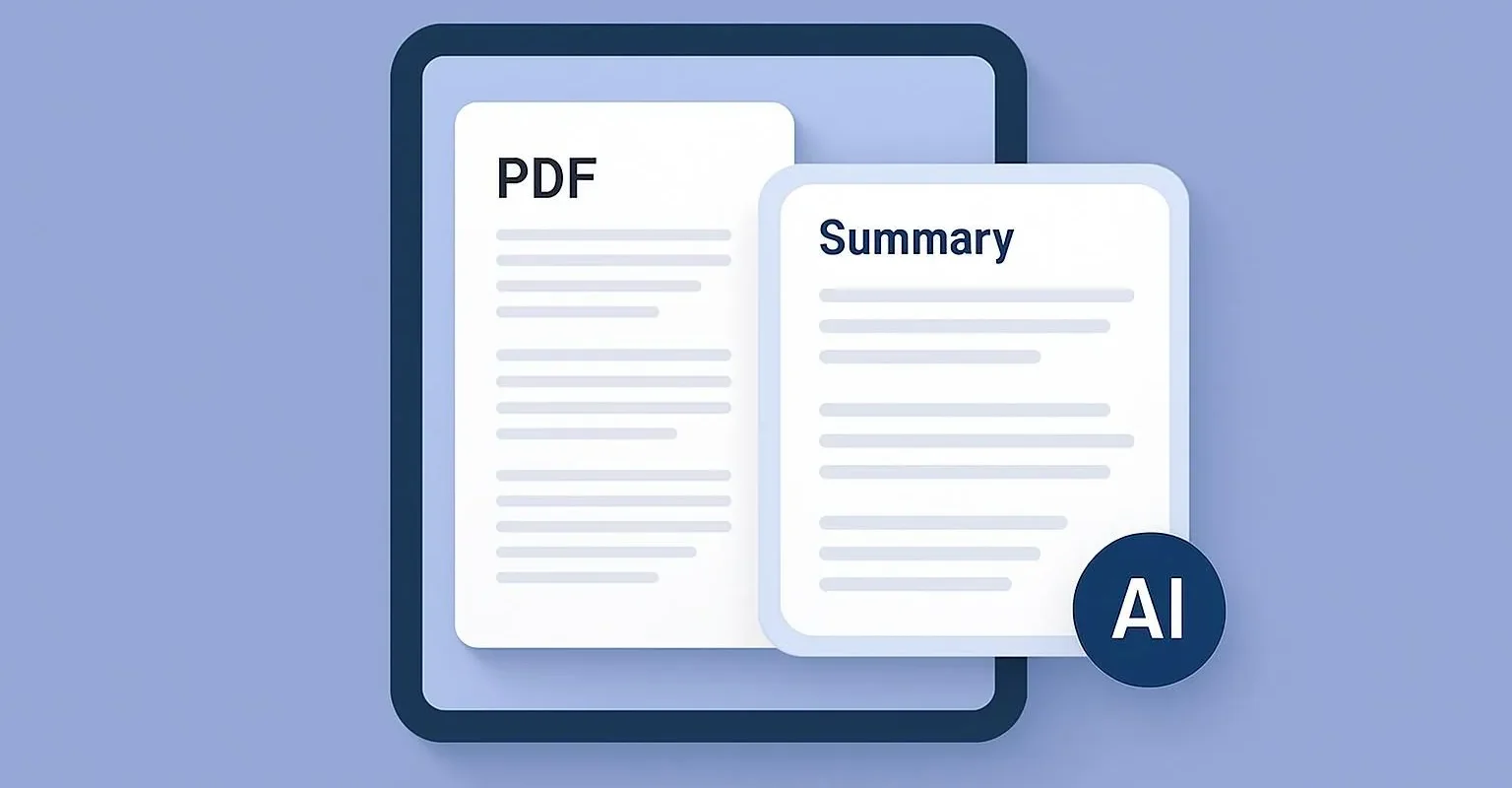
An example of the AI technology automatically summarising a PDF document. Source: Jotform
Top AI Summarisation Tools
The Summarizer provided by QuillBot supports different types of content and allows adjusting the size of the summary. You have an option to use the bullet points or paragraph format, change the tone, and even add your own instructions.
The AI Summarizer of Smallpdf has great potential in PDF documents, research papers, and technical documents. The tool also has clickable reference material back to source material, hence making it ideal in academic and business.
Application Text Summarizer is the solution that seamlessly fits into your current working process. Write summarising content, take out important points in research, and keep it of the same quality.
Table: Comparison of AI Summarisation Tools:-
| Feature | QuillBot Summarizer | Smallpdf AI Summarizer | Application Text Summarizer |
| Content Types | Diverse | PDFs, research, tech | Seamless integration |
| Summary Format | Bullet points, paragraphs | Paragraphs, clickable refs | Custom content, key points |
| Tone Adjustment | Yes | No | No |
| Custom Instructions | Yes | No | No |
| Academic Focus | Moderate | High | Moderate |
| Business Focus | High | High | High |
Innovative Document Processing.
Such tools as NoteGPT and Sharly provide in-depth analysis of documents:
Multi-format: PDF, Word documents, presentations, and images.
Interactive questioning: Question document content.
Mind map creation: Visualizing complicated data.
Translation skills: Summarize other documents in other languages.
Productivity Revolution: Real Numbers.
Now, what is the real extent of the effects of AI automation on productivity? The numbers are staggering:
In knowledge-related work, AI enhances productivity by 40%.
Three-quarters of the employees are currently applying AI at work.
Half of the work activities can be automated nowadays.
McKinsey predicts that AI will help to increase labour productivity by 0.5-0.9 per cent per year by 2030.
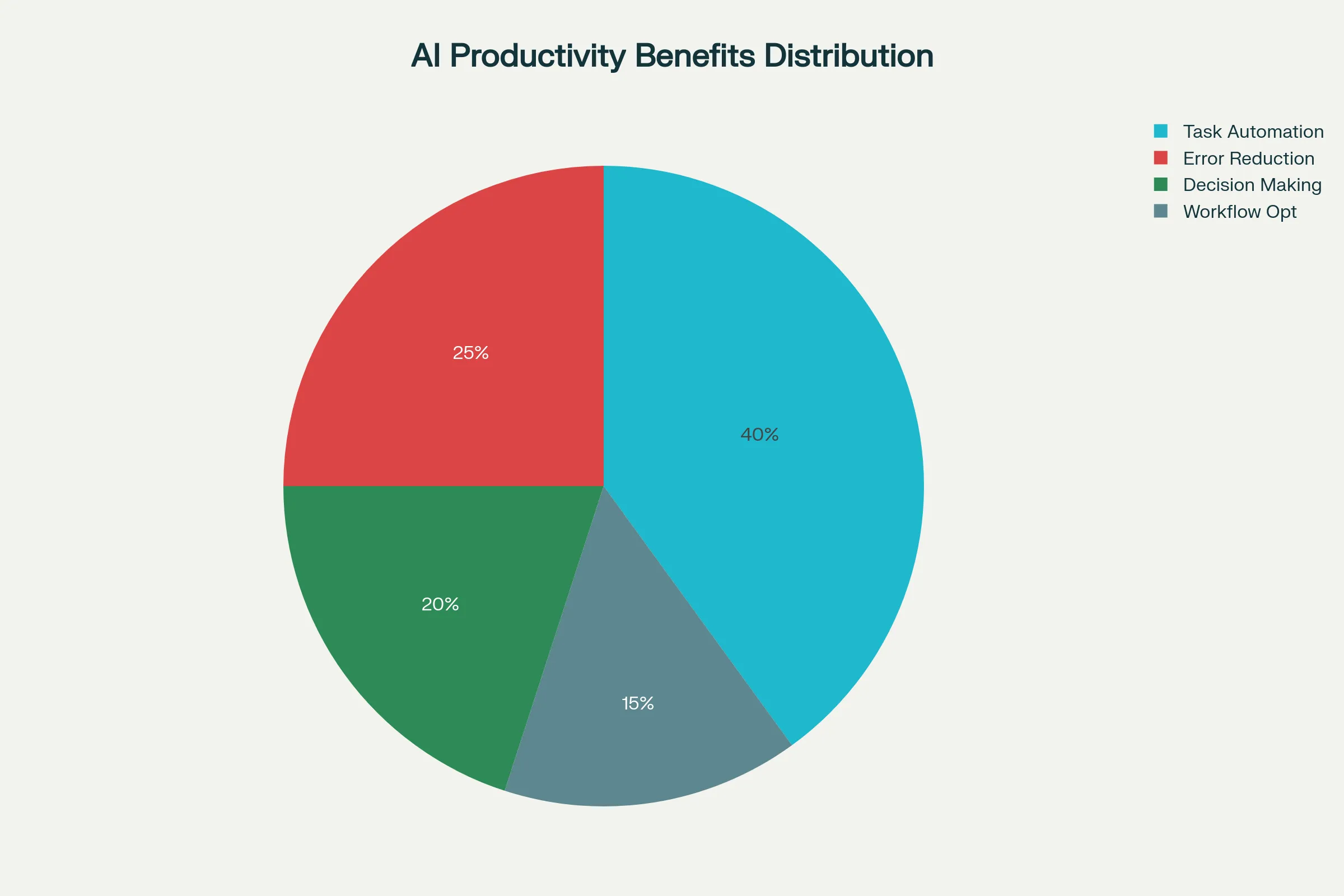
AI Benefit Distribution in Productivity.Source: Amazonaws
Time Savings Breakdown
The email automation alone works out as follows:
Intelligent Prioritization: 30-minute per day time savings.
Artificial Intelligence Composition: 45 minutes a day saved.
Smart Planning: 20 minutes a day saved.
Thread Summarization: 15 minutes saved per day.
Inbox Organization: 10 minutes per day saved.
Total: 2 hours a day, or 10 hours a week.
Installation of Your AI-powered Workflow.
Step 1: Audit Your Existing Process.
It is not possible to implement AI tools without knowing where you spend your time:
Track email time for one week.
Identify tasks that can be automated.
Determine your greatest areas of productivity pain.
Step 2: Choose Your AI Stack
Begin with one tool and add on as you can:
Email Management: SaneBox or Shortwave.
Scheduling: Reclaim.ai or Microsoft Copilot.
Summary: QuillBot or Smallpdf.
Step 3: Integration and Training.
The majority of AI tools learn your behaviour, and hence:
Take them regularly for 2-3 weeks.
Respond to AI making an error.
Set preferences according to your working habits.
Step 4: Measure and Optimise
Monitor your time savings and increased productivity:
Monitor daily email time.
Meetings with counts are automatically scheduled.
Clinical measure documents are handled each week.
Computerised AI Automation Solutions.
Email Follow-Up Automation
Such tools as Fireflies.ai and HubSpot may automatically create follow-up emails depending on the content of the meetings. The AI examines the transcripts of the conversation and generates personalised follow-ups that preserve context and relationships.
Cross-Platform Integration
Current AI systems are incorporated into your whole workflow:
Zapier integrations are between email, calendar, and document applications.
Custom automation workflows are made possible by API integrations.
Airtable and Notion are workflow builders that have AI features.
Collaborative Team Characteristics.
AI does not only apply to individual productivity:
Keyboards: Shared email management using tools such as Missive.
Clockwise calendar optimisation of teams.
Summarising papers together with collective AI assistants.
Overcoming Common Concerns: Will AI Take Away My Personal Touch?
AI complements the human judgement and does not replace it. You ensure that you are in control of major decisions and assign routine duties. The majority of the tools can be customised to fit your communication style and preferences.
What About Privacy and Security?
The most advanced AI tools are concerned about data security:
Enterprise-level security compliant with SOC 2.
International privacy standards: GDPR compliance.
Sensitive communications: End-to-end encryption.
Premise solutions to highly-regulated markets.
Is It Worth the Learning Curve?
The first arrangement is costly, yet the reward is high. The majority of the users are citing good ROI after 2-3 weeks of regular use. Begin with a single tool instead of redesigning your complete work process immediately.
The Future of Artificial Intelligence Assistants.
We are only beginning to peel off the bark of AI. Emerging trends include:
Multimodal AI capable of working with text, voice and images at the same time.
Anticipatory scheduling gets you ahead of your needs before you even know it.
Summarisation that depends on your industry and job context.
Cooperative artificial intelligence agents that cooperate on various platforms.
Getting Started Today
There is no need to wait till tomorrow; these tools are already available today. Here’s your action plan:
This Week:
Select one A.I. email tool and begin a trial version.
Associated with basic automation rules.
Start monitoring your time on email.
Next Month:
Automate the calendar in your workflow.
Test document summarizing software.
Test your productivity gains.
Within 3 Months:
Tune your AI tools according to the usage pattern.
Discover complex integrations.
Think about the upgrade to high-end features.
It is not aimed at substituting human intelligence, but enhancing it. When you leave AI to do the routine work, you become creative in your problem-solving, strategic thinking, and purposeful relationships.
It will benefit your future self by making this change. You will no longer be overwhelmed with digital noise, but you will be clear and able to focus your energy on what you can do best.
Frequently Asked Questions
1. What is the average price of AI productivity tools?
The majority of tools provide freemium versions that begin with between 0 and 10 months of service (basic), and premium services that begin at 15-50 months. The cost is usually compensated by saving time in a few weeks.
2. Does it support my current email provider?
Yes, the majority of AI email tools can connect with Gmail, Outlook, Apple Mail and other large providers and do not force you to switch platforms.
3. What is the level of accuracy with AI summarization tools?
The current AI summarizers can be used with an 85-95% precision on factual information. They are highly efficient at filtering the major information but can omit subtle context; thus careful examination of documents should be performed by humans.
4. Will the use of AI tools result in my reliance on technology?
AI tools are meant to increase your abilities and not to reduce your judgment. You are always in charge of critical decisions and automation of routine operations.
5. What is the duration of seeing productivity improvement?
The results of most users include a tangible saving of time in 1-2 weeks of regular use. The AI tends to reach full optimization after 30-60 days, but it will get to know your patterns and preferences.
Thoughts to consider: Since you are already knowledgeable about web development and AI applications, you may wish to consider trying API integrations to build your own automation processes. Another idea to be considered is the implementation of single-page applications that integrate email management, schedule management, and document summarization into a single interface. Your JavaScript expertise would be ideal to develop responsive dashboards that will present AI-generated insights and productivity indicators, like the ones mentioned in this post.