The 2026 AI Toolkit: New Tools You Should Keep an Eye On
Getting Started
We’re at a very interesting turning point in AI. As we get closer to 2026, what used to be cutting-edge automation is now standard for businesses that want to stay competitive. The world isn’t just changing; it’s changing the way we work, make things, and solve problems. I’ve spent a lot of time looking into and thinking about the most important changes, and I want to share my thoughts on the tools that are worth your time this year.
This isn’t your usual “top AI tools” list. I’m going to take a different approach. I’ll show you the tools that are changing certain workflows, explain why they matter, and most importantly, help you figure out which ones are best for your needs. This guide gives you useful information based on the most recent deployments and real-world performance data, whether you’re a content creator, software developer, entrepreneur, or business decision-maker.
A Big Change in the AI Landscape in 2026
Before we talk about specific tools, let’s set the stage. Generative AI tools, which make text, images, and videos, really took off in 2024 and 2025. The focus has changed a lot since 2026. We’re now in the age of agentic AI, when systems don’t just respond to commands; they also plan, carry out, and improve complex workflows on their own.
This difference is very important. A chatbot can help you with questions. An AI agent finishes tasks. McKinsey research shows that 79% of businesses now use AI agents, but only 19% have reached a meaningful scale because of gaps in tools and governance. This is the most important chance of 2026: the tools that close this gap will give you a competitive edge.
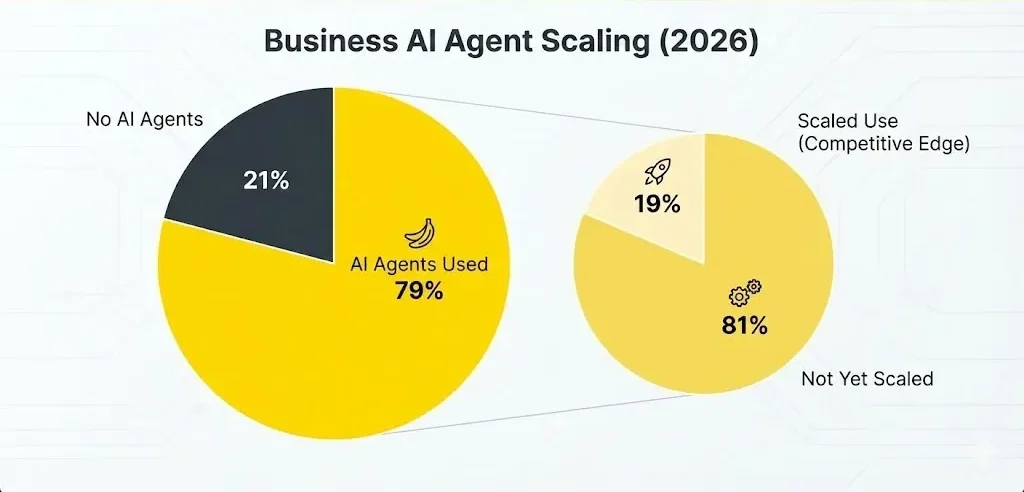
The numbers show how important it is to act quickly. Enterprise AI use has gone up from 55% to 78% in the last year, and investment in quantum computing has gone up 128% in the same time period. At the same time, businesses are seeing measurable returns, such as task completion rates that are up to 40% faster when AI agents are used correctly. Some companies have even seen three times the return on investment.
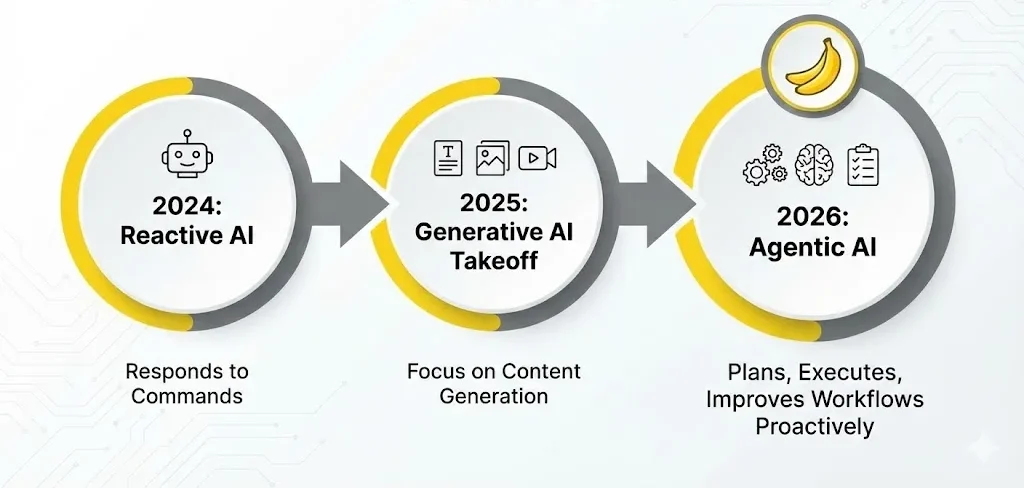
Enterprise AI Adoption Trends
| Metric | 2025 Value | 2026 Value | Trend |
| Enterprise AI Usage | 55% | 78% | 🟢 Increasing |
| Quantum Computing Investment | Base | +128% | 🚀 Surging |
| Task Completion Speed | Baseline | +40% | ⚡ Faster |
Important trends that will change 2026:
Agentic systems are becoming common, going from reactive automation to proactive execution
Multimodal AI integration means that one tool can handle text, images, audio, and video all at once.
Edge AI speedup: Moving processing from centralized clouds to local devices
Small Language Models (SLMs) are specialized AI models that work with larger models to make them more efficient.
AI-native infrastructure is a platform that was made from scratch to support agentic workflows.
The 10 Best AI Tools for 2026
Below is a comparison of the top-performing tools currently dominating the landscape.
| Tool Name | Primary Category | Use Case | Rating |
| ChatGPT 5.2 | Conversational | Reasoning & Planning | ⭐⭐⭐⭐⭐ |
| Claude AI | Reasoning | Long-context & Coding | ⭐⭐⭐⭐⭐ |
| Midjourney V7 | Visual Arts | High-end Imagery | ⭐⭐⭐⭐⭐ |
| ElevenLabs | Audio | Voice Synthesis | ⭐⭐⭐⭐ |
| Kling AI | Video | Cinematic Video Gen | ⭐⭐⭐⭐ |
| Microsoft Copilot | Productivity | Enterprise Automation | ⭐⭐⭐⭐ |
| Google Gemini | Multimodal | Google Ecosystem | ⭐⭐⭐⭐ |
| Cursor IDE | Development | AI-Native Coding | ⭐⭐⭐⭐⭐ |
| Perplexity | Search | Research & Citations | ⭐⭐⭐⭐⭐ |
| Higgsfield AI | Video | Social/Creative Video | ⭐⭐⭐⭐ |
The Big Players in Conversational AI
We should start with conversational interfaces, which is where most people use AI every day. But the category has grown a lot since the new tools of 2024.
ChatGPT (OpenAI) is still the best on the market, and for good reason. Its newest models, especially the o1 and o3 versions, have advanced reasoning skills that go far beyond just making text. I’ve tested these a lot, and I’m really impressed by how well they can think through complicated technical and strategic problems. It is truly flexible because it can work with image recognition, file handling, and web access in real time. But it’s becoming more like a commodity, and the differences between competitors are getting smaller.
Claude (Anthropic) has become the more nuanced choice, especially for tasks that need:
Longer thought and deeper reasoning on hard problems (with the help of tools, which are now in beta)
Long-context processing: Claude can handle 200,000 tokens of input, which means he can read whole codebases or research papers in one conversation.
Ethical reasoning alignment—Constitutional AI training makes people much more careful when dealing with edge cases.
Understanding code is a specific skill that is useful for technical analysis and debugging.
The developer ecosystem that is growing around Claude is what makes it stand out. Claude is the engine behind Cursor IDE (which we’ll talk about later), and the two work well together for development workflows. Claude is now used by business apps like Amazon’s Alexa+.
Google Gemini is in the “native integration” lane. Gemini’s smooth integration is really useful if you’re already using a lot of Google products, like Gmail, Docs, Sheets, and Search. It can handle images, documents, and video natively, which is very advanced. The free tier often gives you access to advanced models that ChatGPT only gives you access to in premium tiers. But sometimes, the quality of the conversation seems to be a little behind the leaders.
Perplexity AI is something that researchers, journalists, and people who work with knowledge should pay close attention to. Perplexity was made specifically for research-related questions, unlike ChatGPT or Claude, and it shows. The tool searches the web in real time, gives detailed citations (which is a big plus over ChatGPT), and makes synthesis reports on hard-to-understand subjects. It’s become an essential part of my work for checking facts and making decisions based on evidence.
Grok (X’s built-in AI), HuggingChat (open-source), and Pi (Inflection AI) are all free options that are worth mentioning. Each one is good for a specific purpose, but they don’t have as much reasoning depth as the best ones.
AI-Powered Coding: The Developer’s Toolbox
AI has completely changed how software is made. The question is no longer if developers use AI tools, but which ones they like best and why.
Cursor IDE has quietly become the most popular choice among serious developers. It’s not just an autocomplete extension; it’s a whole new development environment built on top of Visual Studio Code, with Claude 3.5 Sonnet built in everywhere. Here’s what makes it stand out:
Multi-file reasoning and refactoring: You can describe a feature and have Cursor change the structure of more than one file at the same time.
Agent mode (Composer) lets you generate code almost on its own, but it needs feedback in small steps instead of constant prompts.
Context management: Developers decide which files, documentation, and frameworks are in scope, which stops hallucinations.
Familiar interface—because it’s a fork of VS Code, switching costs are low.
Real developers who use Cursor in production say that it speeds up prototyping by a huge amount, especially when it comes to building new projects and refactoring code across files. But it needs to be worked on over and over again; expecting Cursor to make systems ready for production without any changes is foolish.
For developers who need raw reasoning power without the IDE overhead, Claude API works well with Cursor. The newly announced beta version of “extended thinking with tool use” lets Claude think while using tools, which creates an agentic loop that is helpful for solving complicated technical problems.
Amazon CodeWhisperer is made for Java and Python developers who work for businesses. It works with JetBrains IDEs and has features similar to GitHub Copilot, but it has AWS-specific improvements and security controls for businesses.
Replit AI has found an interesting niche in full-stack web development. It lets developers build whole applications (frontend and backend) through conversation and make code that can be deployed in minutes.
Making Visual Content: More Than Just Making It
The creative AI field has come a long way. We’ve moved on from the novelty phase when any AI-generated image was interesting. Now, the differences are in speed, quality, consistency, and control.
Midjourney is still the best at making images that look good. The new V7 model is a big step forward:
Better understanding of text prompts—Text in images, complicated spatial relationships, and stylistic differences all get better.
Personalization by default—Midjourney learns your style preferences in just five minutes of setup time.
Draft Mode makes pictures ten times faster and costs half as much, and you can use your voice to change things in real time.
Unified conversational interface: You can ask for changes in a conversation, like “replace the cat with an owl,” and Midjourney will change the prompt and start over.
Midjourney’s quality edge is real and worth the money for people who make fashion, concept art, marketing visuals, or design exploration. It is especially useful for professional work because it has commercial use rights and can be upscaled to 2048×2048 pixels.
Video makers are now seriously considering Runway ML. Its growth from a test tool to a platform ready for production is amazing:
Gen-3 Alpha and Gen-4 models can change images to videos, videos to videos, and keep characters the same.
Advanced camera controls, like keyframe animation, specifying camera movement, and motion control that is as good as professional video software
Character persistence: Gen-4 image conditioning makes sure that characters look the same in all clips.
Resolution options: native 1280×768, with the option to upscale to 4K
Quick iteration—Turbo mode focuses on speed for exploration, while standard and quality modes focus on the final output.
The cost structure uses credits (10 credits per second for Gen-3 Alpha, 5 for Turbo, and 12 for Gen-4), which makes it easy to try out and cheap enough to use for production work. Runway’s features are really impressive for independent filmmakers, agencies, and content creators.
HeyGen is an expert in making AI avatars and personalizing videos for a lot of people. HeyGen’s recent updates (4K resolution, interactive avatars that answer questions, and automatic lip-sync across 175+ languages) make it one of a kind if you need to make localized video content for different markets.
Changing SEO and Content Strategy: The Move to AI Search
This is where things get really serious for content creators, marketers, and anyone else who wants to be seen online. In 2024, SEO was all about getting a good ranking on Google. The game has changed a lot by 2026.
Semrush has seen this change and taken advantage of it with Semrush One, the first platform that combines traditional SEO with AI search optimization. This is important because:
The truth is that ChatGPT, Perplexity, and Gemini are becoming the main ways for people to find things, especially younger people. Your content might do well on Google, but it might never show up in AI-generated answers. This makes it hard to see what’s going on strategically.
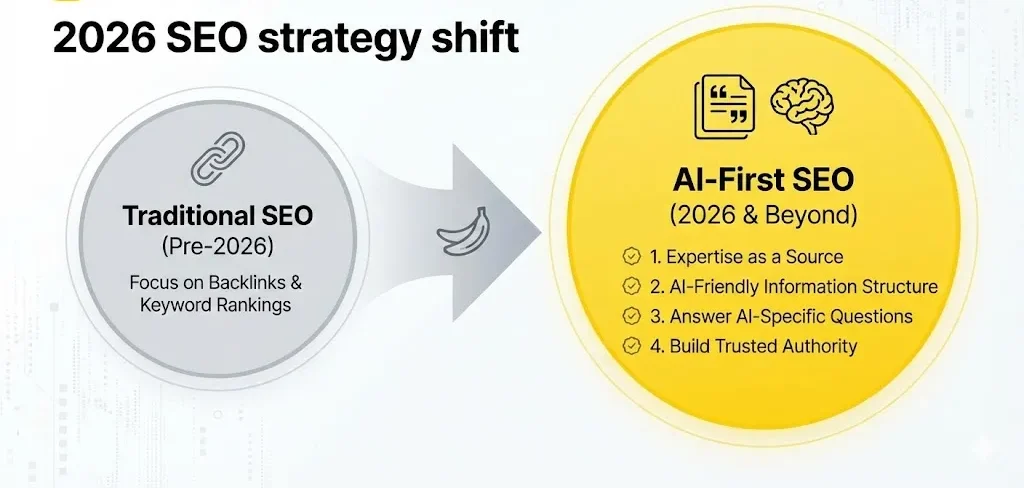
How Semrush One is different:
AI Visibility Tracking keeps track of how often your brand shows up in AI-generated answers on ChatGPT, Perplexity, Gemini, and Google’s AI Overview.
Competitive analysis—Find out which AI answers are using content from your competitors
AI-specific optimization: Semrush gives you real-time advice on how to set up content for AI systems, not just regular search algorithms.
Unified dashboard: Keep an eye on traditional SEO metrics and AI visibility all in one place, with an eye on how they affect revenue.
In a real-world example, Coalition Technologies used these tips to increase AI referral traffic by 429%. They changed their content strategy from keyword rankings to citation prominence by focusing on getting mentioned in AI-generated answers for high-intent queries.
Content optimization for 2026 means:
Making sure that your expertise is used as a source (not just your content ranking)
Organizing information in ways that AI systems can easily find and combine
Answering the specific questions that AI systems are answering in their overviews
Building up your authority on a topic that AI systems trust and use
AI for Business Intelligence and Making Predictions
There is a big problem for finance teams and business leaders: traditional dashboards and reporting tools were made for people to use. We’re moving to AI that understands business context and makes insights on its own in 2026.
AI agents are now used by the best financial forecasting platforms to automate what used to take hours of manual analysis:
Drivetrain, Pigment, and Anaplan all use ML-powered forecasting to look at past trends, find patterns in the market, and make scenarios automatically.
These platforms let you ask questions in plain English. For example, “What if churn goes up by 3% next quarter?” will give you automated analyses with new projections.
Variance analysis is now done automatically. Instead of having to look into why actuals were different from forecasts, AI agents find problems and suggest possible causes.
This is a real return on investment (ROI) for businesses from the middle market to the enterprise level. Teams say they see real improvements in the accuracy of their forecasts within the same planning cycle, usually within six months.
AI drug discovery is one of the most important uses of AI in specialized fields. The market for AI-driven drug discovery in the pharmaceutical industry is expected to grow from $24.51 billion in 2026 to $160.49 billion by 2035, at a rate of 23.22% per year.
Why? AI cuts the time it takes to develop new drugs from more than ten years to only 18 months (as shown by Insilico Medicine) and makes efficacy screening much better.
The AI Agent Revolution in Enterprise Automation
This is where 2026 really starts to change things. AI agents, which are self-driving systems that plan, carry out, and improve tasks, are going from pilot projects to mission-critical infrastructure.
The scale: IDC says that by 2026, 90% of Indian companies will use AI agents. Other developed markets are likely to follow the same path. According to McKinsey’s research, agentic AI will add $2.6–4.4 trillion to the economy each year.
Low-code platforms that let non-technical teams build agents are very important for infrastructure:
OutSystems, Mendix, and Appsmith all have agentic workflows, but they are all at different stages of development.
Mendix includes Maia, an AI assistant that helps developers build apps and suggests ways to make them better.
Works well with modern DevOps; Git version control, cloud-native architecture, and enterprise governance are built in, not added on.
Agent applications that will be useful in 2026:
Customer service: self-driving agents taking care of simple questions and smartly passing them on to humans
Supply chain optimization—agents find problems and suggest other options before they run out of stock
HR tasks include writing policies, keeping track of compliance updates, and automating routine approvals.
Sales and marketing: agents qualify leads, set up follow-ups, and tailor outreach to a large number of people.
Tools that are worth your time and attention
In addition to the main categories, there are a few specialized tools that should be highlighted for certain situations:
AI for Project Management:
ClickUp with ClickUp Brain: AI task summaries, smart automation, and project analysis
Taskade is a lightweight project management tool that uses AI to automate routine tasks.
Forecast PSA is an AI-based tool for managing resources and projects in the professional services industry.
AI for Rules and Papers:
Litespace’s HR AI Agent writes company policies and checks them for compliance to make sure they follow the rules.
SweetProcess and Scribe can make standard operating procedure (SOP) documents from videos or screenshots.
Writing and Content:
Jasper AI for keeping your brand voice and marketing copy the same
Notion AI for organizing content and managing knowledge
GrammarlyGO helps you write better and makes your writing clearer.
Making Your Own Technology Radar
I suggest the following as your decision-making framework for 2026:
Look at your main workflow. Which areas does AI have the most effect on: writing code, coming up with new ideas, analyzing businesses, talking to customers, or writing documentation?
Check what needs to be integrated. Will the tool work with your current stack, or will it need to be automated in a different way (like with Zapier, Make, or n8n)?
Think about how long it will take to learn. You have to learn how to use tools like Cursor and Runway ML on purpose. ChatGPT and other simple tools have very little friction. What is right for your situation?
Make plans for iteration. Every month, AI tools are getting better. Include some money for experimentation in your plans.
Know how prices change. A lot of tools have stopped charging monthly fees and started charging based on how much you use them or how many credits you have (Runway ML, Midjourney). Don’t just look at the lowest prices for marketing.
Things that are hard and things that are hard to do
Before you put your plan into action, make sure you understand the real limits:
Hallucinations are still real. Compared to 2023, Claude and GPT-4 have significantly lower rates of hallucinations, but they still happen. Always check the facts, especially if you’re working with customers.
Data privacy issues need to be looked into. Uploading private data to AI services run by other people is risky. Many companies are moving their sensitive work to on-premise deployments or private cloud instances.
The quality of the work changes depending on the tools used. An AI tool that is great at making code might not be as good at writing with subtlety. Testing in your specific case is a must, not an option.
Governance is behind in adoption. 78% of businesses use AI, but not many have strong governance frameworks. If this isn’t fixed on purpose, it could lead to compliance and quality problems.
There really is a talent gap. To use these tools correctly, you need to learn how to do so. There is a huge difference between someone who uses Claude casually and someone who optimizes prompts, manages context, and iterates strategically.
What to Expect in Late 2026 and Beyond
There are a number of things that are going to happen soon:
Multimodal AI agents that can see, hear, read, and do things at the same time (more advanced than the multimodal models we have now)
Edge AI maturation—Running useful AI tasks locally instead of in the cloud to lower latency and protect privacy
Vertical AI is a type of AI that works better than general-purpose models for specific tasks in certain fields, like healthcare, law, and manufacturing.
Better cost-effectiveness: Smaller language models and quantization techniques cut down on the amount of computing power needed for AI inference by a lot.
What you should remember
It’s no longer about finding the “best” single tool in the 2026 AI toolkit. It’s not about that; it’s about creating a unified ecosystem:
ChatGPT, Claude, and Perplexity are examples of conversational AI that can do research, write, and think strategically.
Specialized development tools speed up coding and other technical tasks (Cursor, Claude API)
Creative tools change how content is made (Midjourney, Runway ML)
With automation and proactive insights (Semrush One, Drivetrain, Anaplan), business intelligence becomes AI-native.
AI agents are becoming more and more important for automating workflows in enterprise infrastructure.
In 2026, the companies that will be successful are not the ones with the most tools. They are the ones that know which tools work best for their specific workflows and how to combine them without making the ecosystem hard to maintain and broken.
Questions that are often asked
Q1: What AI tool should I use first as a beginner?
A: ChatGPT is still the easiest to get into because its interface is easy to use, it has a lot of features, and there is a lot of documentation available from the community. Once you feel comfortable there, switch to specialized tools that fit your specific workflows, like Cursor for coding or Midjourney for visual content. This method builds understanding while keeping mental effort to a minimum.
Q2: Should I pay for AI tools, or can I get by with free ones?
A: Free versions are great for testing, but they usually have limits on how many times you can use them or what features you can use. If you’re using an AI tool for work, it’s worth it to pay for premium tiers (which usually cost $15 to $40 per month for specialized tools) because they help you get more done. The return on investment (ROI) usually shows up in weeks, not months.
Q3: How do I deal with AI hallucinations and make sure my work with customers is correct?
A: Don’t ever publish AI output directly. Set up a verification process: for factual claims, check the sources; for code, test it in the real world; and for creative work, have people review it to make sure it fits with your brand. For checking facts, use Semrush, and for thinking through complicated claims, use Claude.
Q4: What is the biggest mistake companies make when they start using AI?
A: Using AI as a replacement for human judgment instead of as a tool to improve it. The companies that get the most return on investment (ROI) use AI to get rid of busywork so that people can focus on making strategic decisions. If you switch this around and use people for data entry and AI for strategy, you’ll run into a lot of problems.
Q5: How should I get ready for changes to AI tools in 2027 and beyond?
A: Make your workflows flexible. Instead of deeply integrating one proprietary tool into your processes, use abstraction layers (like Zapier or Make) that let you switch tools without having to rebuild workflows. Write down why you made your decision so that you can systematically look at other options when tools change.


Pingback: Building Your 2026 AI Learning Plan: The Complete Roadmap for Career Transformation - Bing Info
Pingback: How to Prepare for Regulation: How to Stay Ahead of Compliance in 2026 - Bing Info