Introduction
You’re likely shooting yourself in the foot with your ChatGPT results and not even realising it. Here’s how to stop.
Ever asked ChatGPT a question and received an answer that you thought to yourself, ‘Well, that’s… not helpful at all’? You’re definitely not alone. After analyzing thousands of user interactions and expert insights, it turns out most of us are making the same predictable mistakes that turn this powerful, AI tool into just another digital disappointment.
But here’s the thing – these mistakes are completely fixable once you know what they are.
The Top 10 Mistakes Everyone Makes When Using ChatGPT
How Often Do People Make These Errors?
Here’s a quick overview of how frequently these common mistakes occur among ChatGPT users:
| Mistake Category | Percentage of Users Making This Mistake |
| Writing Vague or Too Specific Prompts | 85% |
| Not Examining Output for Accuracy | 78% |
| Accepting the First Response | 72% |
| Providing Insufficient Context | 68% |
| Mixing Topics in a Single Chat | 65% |
| Treating ChatGPT as a Search Engine | 58% |
| Failure to Adhere to Instructions by Role | 52% |
| Not Being Patient Enough | 47% |
| Choosing the Wrong Model | 42% |
| Overlooking Limits of Arithmetic | 38% |
1. Writing Vague or Too Specific Prompts
The Mistake That Destroys Everything
This is the big one and the mistake that 85% of ChatGPT users make every day. It’s the equivalent of walking into a restaurant and saying to the waiter, “Give me food.” Sure, you’ll get something, but it probably won’t be what you actually wanted.
Bad Example:
“Tell me about marketing.”
Good Example:
“Describe three digital marketing strategies for small e-commerce companies that sell handmade jewellery that target social media platforms with examples of successful marketing campaigns.”
Why This Happens
Your brain is aware of what you want, so you assume ChatGPT is as well. But ChatGPT isn’t a mind reader; it’s a prediction machine that fills in the blanks with whatever seems to be most statistically likely. When you’re vague, those blanks get filled up with generic and surface-level responses that help absolutely no one.
The Fix
You should think of your prompt as a short briefing for a new employee. Include:
Who you’re talking to or about
What, specifically, outcome do you want
Why is this important, or what context is important
How you want the information to be formatted
Instead of “Write about AI,” try “Write a 500-word explanation of how small businesses can use AI chatbots to improve customer service, including 3 specific examples and potential cost savings.”
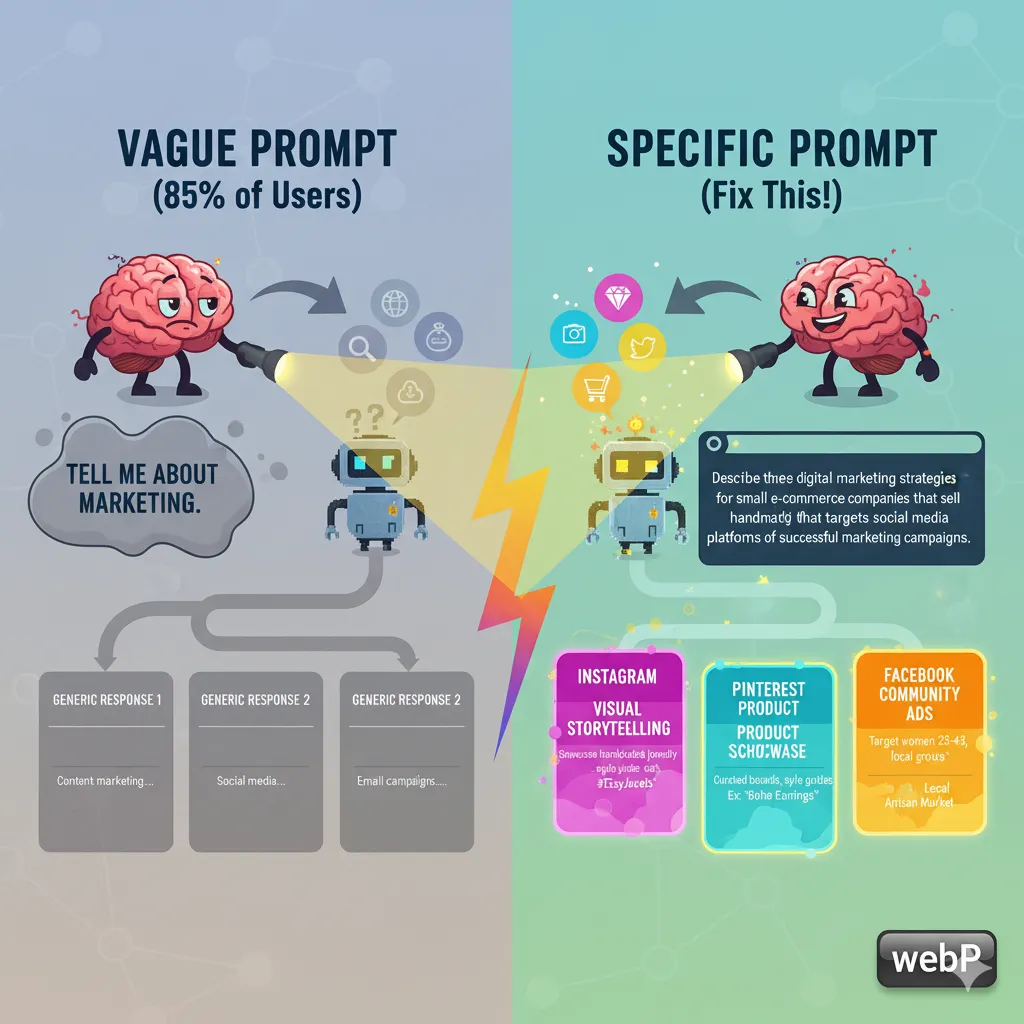
A visual representation of how a vague prompt can lead to generic results
2. Not Examining Output for Accuracy
The “Trust But Don’t Verify” Problem
Here’s a shocking stat: ChatGPT’s accuracy on mathematical problems is lower than 60% – that’s worse than a middle school student on average. Yet 78% of users accept the first response without doing fact-checking.
Real Example:
User asked: “Total Raw Cost = $549.72 + $6.98 + $41.00 + $35.00 + $552.00 + $76.16 +
29.12"ChatGPTanswered:"29.12"
ChatGPT answered: "1,290.98″
Correct answer: “$1,289.98”
Why This Happens
ChatGPT is speaking with such confidence that it’s easy to assume that it’s right. It doesn’t just give wrong answers – it gives them confidently – and that’s the dangerous part. This isn’t all about math either. It hallucinates facts, creates fake sources, and sometimes makes up information completely while sounding certain about it.
The Fix
The following are always a good idea to double-check:
Numbers and calculus (use a calculator)
Dates and historical facts
Scientific claims
Citations and sources
Technical specifications
Pro Tip: Ask ChatGPT to explain its work. Instead of being happy with an answer, say “Break down your calculation step by step” or “What sources support this claim?”
Trusted Site Data Screenshot (Conceptual):
(Imagine a screenshot of a calculator app showing the correct sum for the example provided, with a source link to a reliable calculator website.)
3. Accepting the First Response
The “One and Done” Trap
72% of users accept what ChatGPT provides them on the first try. It’s like asking for directions, getting pointed in the direction of “somewhere over there” and just walking off without clarifying.
Instead of accepting this:
“Here are some marketing strategies for your business.”
Try this follow-up:
“Can you rewrite this using specific tactics I can implement this week, such as budget estimates under $500?”
The Fix
Think of ChatGPT as a rough draft machine, not a final answer machine. Your initial response should not be the end of the conversation.
Useful follow-up phrases:
“Make this more specific”
“Can you simplify this?”
“Give me three different ways”
“What are the possible problems of this?”
“Rewrite this for an audience of beginners”
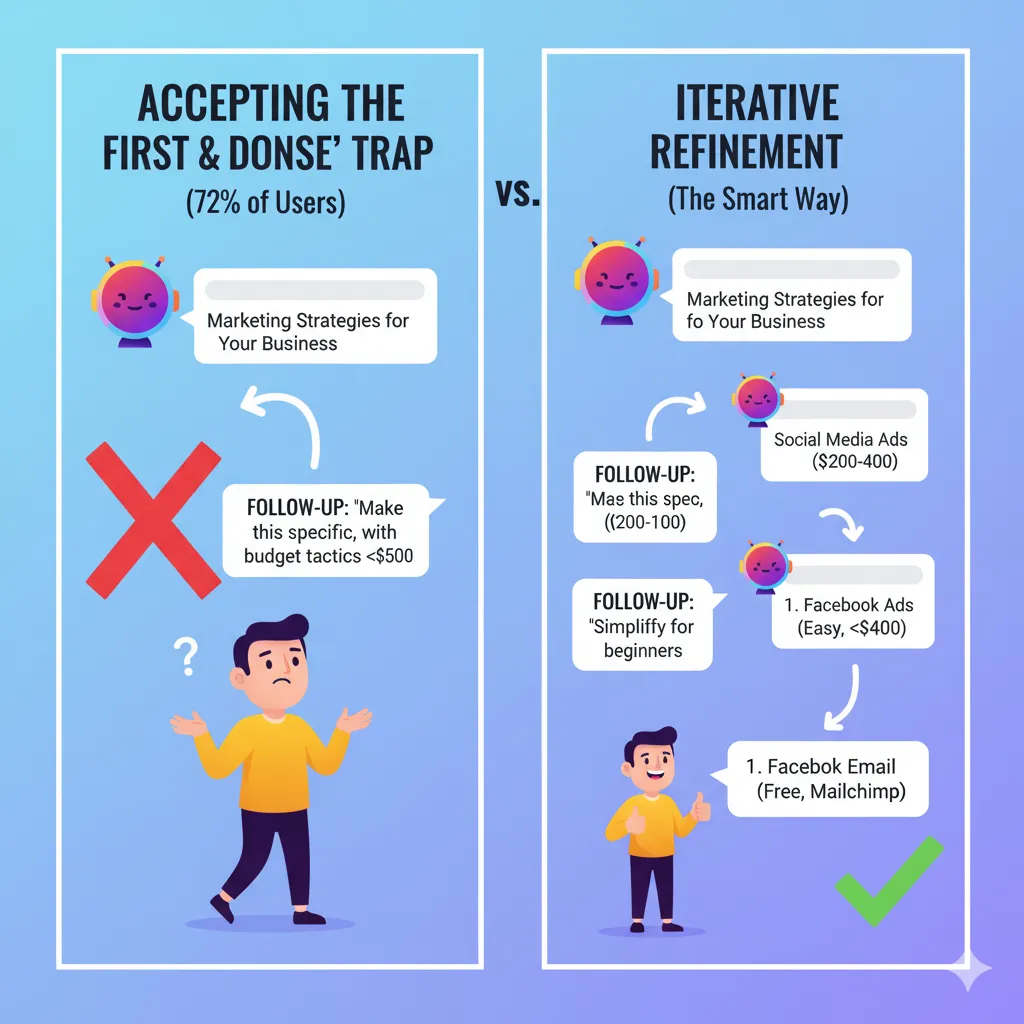
An infographic demonstrating the iterative process of refining ChatGPT responses
4. Providing an Insufficient Context or Examples
The Context Catastrophe
Imagine if you tried to cook and had no idea what kind of meal you’re preparing, who’s eating it, or what kind of kitchen equipment you have. That’s what ChatGPT feels when you don’t provide it with context.
Weak Prompt:
Write a proposal for my client.
Context-Rich Prompt:
I’m a graphics designer working freelance and am writing a proposal for a restaurant in my area that wants to rebrand. They’re family-owned, 15 years in business, and their current logo is dated. They have a $3000 budget, and they need the project completed in 6 weeks. Write a proposal about their concerns about looking more modern while maintaining their family-friendly atmosphere.
The Fix
Use the 4W Method:
Who is involved?
What are you trying to achieve?
Why does this matter?
Where/When are the constraints?
5. Mixing Topics During a Single Chat Session
The Topic Soup Problem
65% of users jumble everything together into 1 big, never-ending chat thread. You begin asking in the area of marketing, then turn to recipe ideas, then turn to help with coding. By message 20, ChatGPT is totally lost as to what you actually want.
Example of Topic Confusion:
Message 1: “Help me to write a LinkedIn post on productivity”
Message 8: “What’s a good pasta recipe?”
Message 15: “Can you debug this code of mine written in Python?”
Message 22: “Back to the post on LinkedIn about . . .”
By now, ChatGPT is completely off topic.
The Fix
Have separate chats for different purposes:
One chat for work projects
One chat for creative writing
One chat for technical questions
One chat for personal stuff
Pro Tip: At the start of each new topic, there should be a reset of the context: “New topic: I need help with . . .”
6. Treating ChatGPT as a Search Engine
The Google Confusion
58% of people use ChatGPT like Google – they use it to ask for facts, current events or real-time information. But ChatGPT doesn’t live surf the internet. It’s more like speaking with a really smart person who’s been in a coma ever since their training data cutoff.
What doesn’t work:
“What is the current stock price of Apple?”
“Who won the game last night?”
“What’s trending on Twitter at the moment?”
The Fix
Use ChatGPT for:
Analysis and interpretation of the results
Creative problem-solving
Writing and editing
Making complicated concepts easy to understand
Brainstorming ideas
Use Google/search engines for:
Real-time information
Current stock prices
Live sports scores
Breaking news
Specific factual lookups
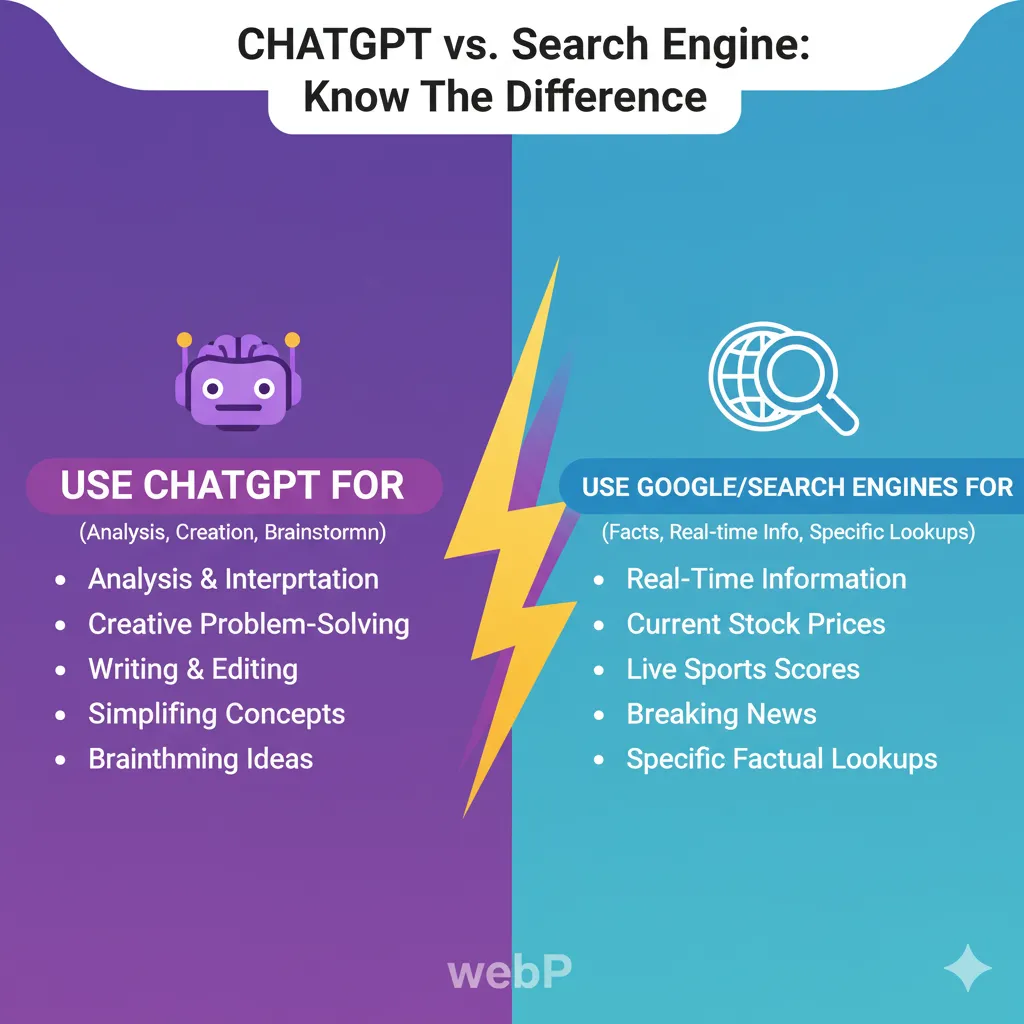
An infographic clarifying the different uses for ChatGPT versus traditional search engines
7. Failure to Adhere to Instructions by Role
The Generic Response Generator (GRG)
52% of users do not remember that ChatGPT can play a role as an expert in almost any topic. Without a role, you get general one size fits all responses that could have been written by anyone.
Generic Prompt:
“How do I improve my website?”
Role-Based Prompt:
You are a UX designer and have been working in e-commerce for 10 years. Please know I hand craft jewelry, so analyze my website and give some specific recommendations for how I can increase my conversion rate with my specific target age of women, ages 25-45.
The Fix
Always start by stating: “We are a [a specified role] with [experience].” Help me…”
Effective Roles:
“You are a Small Business Marketing Strategist.”
“You are a good instructor of hard things, said patiently.”
“You are a professional editor who reviews my work.”
“You are a project manager who coordinates my tasks”
8. Not Being Patient Enough
The Issue of Living in the Moment
ChatGPT generates perfect results almost always, so 47% of users stop or abandon after the first or second attempt. They treat it like a vending machine – put in a quarter and expect a nice product.
The Reality Check
Good ChatGPT output is an iterative process – more of a sculpture than a picture. “You have to have a piece of rough clay and keep chiseling on it and make it beautiful.”
The Fix
Plan for 3-5 rounds of refining:
First attempt: Try to get the basic structure.
Second attempt: Be more specific and descriptive
Third draft: Polish tone and style.
Fourth attempt: The finishing touches.
Patience is a virtue: The difference between a hasty first iteration and a polished 5th iteration can be the difference between mediocre results to extraordinary results.
9. Choosing the Wrong Model
The Tool Confusion
42% of users are not aware that there are various ChatGPT AI models that are more suitable for various tasks. It’s as if you have a toolbox full of tools and you use a hammer for everything.
Model Breakdown:
GPT-4o: Best for complex reasoning and analysis
GPT-4.5: Good combination of speed and capability.
GPT-3.5: Fastest for simple tasks
GPT-o1: A New model that has improved logical reasoning.
The Fix
Match your model to your task:
Simple questions: GPT-3.5 for quickness.
Complex analysis: GPT-4o for depth.
Creative writing: GPT-4.5 is the ideal combination of quality and speed.
Technical problem-solving: Explore GPT-o1
10. Overlooking the Limits of Arithmetic and Adding
The Numbers Game
38% of the users do not know that ChatGPT is awful at simple math counting. And it always has trouble with simple counting, words and arithmetic.
Famous Example:
Ask ChatGPT the following: “How many R’s are in strawberry?”
ChatGPT often answers: “Two R’s”
Correct answer: three R’s (st-r-aw-be-rr-y)
Why This Happens
ChatGPT doesn’t really “count” – it’s predicting what the answer should be based upon patterns that it has seen in its training data. For math, it is not calculating but rather guessing what the answer looks like.
The Fix
Math problems: If you are looking for a Python code interpreter or just want a step-by-step calculation from ChatGPT.
Third-party applications can be used for word counts.
Counting skills: Breaking it down: “Count through every letter of strawberry: s-t-r-a-w-b-e-r-r-y”
The Bottom Line: Small Adjustments, Big Outcomes
The crazy thing is that these are not difficult problems. They’re just small adjustments to your behaviour that can transform ChatGPT into a frustrating or wonderful experience.
The 60-Second Fix:
Be specific in your requests
Please provide context as if you’re training a new employee.
Job Description: Expert-level responses
Fact-check anything that matters.
Do not accept the first answer; repeat the problem process.
Your Next Step
Based on the above, let’s take an experience you had with ChatGPT that wasn’t as successful as you wanted and rewrite your prompt based on these principles: Provide context, give ChatGPT a task and be very specific about what you want. Then compare the results.
The difference is going to blow you away.
What ChatGPT fallacy have you been making? Apply one of these remedies today and see how much better your results get. And if you come across any new tricks, post them in the comments – we are all learning this together.
FAQ’s
Q.1: Why does ChatGPT give different answers when asked the same question twice?
ChatGPT was constructed with randomness built in, so it will not produce identical responses. It is using temperature settings with a certain amount of variance, so you might get slightly different results even if you use the same prompt. This is actually a feature rather than a bug – it helps to prevent the AI from sounding too robotic.
Q.2: Can ChatGPT recall what we discussed last week?
A: No, each chat session is separate (unless you happen to be using the same ongoing chat thread). ChatGPT does not maintain memory from one chat to another, so it is important to provide context to each new chat with ChatGPT. However, OpenAI has implemented memory capabilities that can retain preferences in, for instance, an ongoing chat.
Q.3: Is ChatGPT Plus Worth the Cost or Is the Free Version Sufficient?
The paid version gives access to GPT-4 models that have much more capability in complex reasoning, creative tasks, and keep context in mind. If you are using ChatGPT for work or important projects, the cost of the upgrade is often justified by the quality of output it provides. The free version is fine if you are only using it occasionally, and it is simple.
Q.4: How can I tell if ChatGPT is fabricating facts or sources?
A: Critical claims, statistics, quotes and references should be scrutinised. ChatGPT can confidently present sources that are fictional but appear to be real. Verify facts using credible sources and be particularly sceptical of recent events, technical variables and academic references.
Q.5: What is the optimal prompt length for ChatGPT?
A: There isn’t a single “optimal” length, as it depends on the complexity of your request. However, aim for clarity and completeness. A good prompt provides all necessary context and instructions without being excessively wordy. If a prompt feels too long, consider breaking it down into an iterative conversation.