Bing Info

Tech Insights & Digital Innovation
Header Mobile Fix

Bing Info

dataops-for-ml

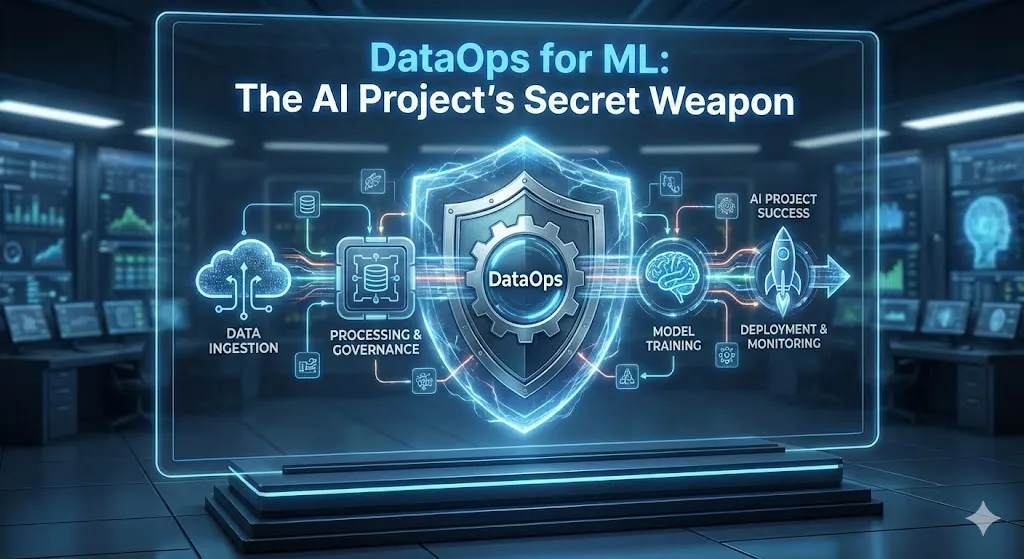
DataOps for ML: The AI Project’s Secret Weapon

DataOps for ML: The AI Project’s Secret Weapon The Beginning: The Dirty Truth About AI Projects That No One Talks About I want to be clear with you. For the past 12 years, I’ve been working on AI tools in the trenches, and I’ve seen great machine learning teams make models that never get used. The data scientists? The best talent. What are the algorithms? The best of the best. But those projects still ended up in a Jupyter notebook folder that no one remembers, where they are gathering digital dust. Here’s the gut punch: 95% of AI projects don’t really help businesses. That number comes from new research at MIT, and it didn’t blame complicated algorithms or not having enough computing power. No. It pointed straight to problems with data quality, broken pipelines, and the lack of proper data operations. Give it some thought. You could make the smartest machine learning model in the world, but if you give it bad data—like missing values, inconsistent formats, biased samples, or just plain old information—it’s useless. Imagine that you are an F1 engineer putting your heart and soul into a Ferrari engine, only to put it in a rusty shopping cart. That’s what happens when you don’t use DataOps for ML. DataOps isn’t the cool part of AI that gets a lot of attention at conferences and on LinkedIn. The pipelines, validation, monitoring, and collaboration that go on in the engine room are what really turn fragile experiments into production systems that make millions of dollars. And now that it’s December 2025 and AI is being used more and more in all kinds of businesses, ignoring DataOps is like building skyscrapers on sand. Who This Is For (And What You’ll Get Out of It) This is for data scientists who are tired of having to retrain models every time the data changes. Data engineers are having a hard time fixing pipelines by hand. ML leaders see 85% of projects fail to deploy. And business leaders who are confused about why their AI investments aren’t paying off. You will understand by the time you finish reading: How DataOps and MLOps turn AI that focuses on experiments into systems that are important to business. Real-life examples that show the ROI. A full 5-stage DataOps workflow with tools that will work in 2025. The hard problems teams have to deal with (and how to solve them). Trends in 2025 include pipelines powered by AI and DataOps that happen in real time. The reward? You’ll see the holes in the data that are ruining your projects and know how to fix them. Let’s get started. Image -“DataOps workflow pipeline showing five stages from data ingestion to monitoring” What is DataOps? Breaking Down the Basics of ML Success DataOps isn’t just a buzzword that people in Silicon Valley came up with. Let me put it this way: I’m getting coffee with you. DataOps is the heart of your AI project. It’s a set of tools, processes, and best practices that make sure data flows from messy sources like APIs, databases, logs, and user events to your ML models quickly, cleanly, and reliably every time. It uses DevOps principles like automation, continuous testing, working together, and making things better over time to manage data. The datasets that your models train on are owned by the data operations teams. They keep track of quality, lineage, versioning, and freshness. Your ML models would be learning from old news or broken files if you didn’t have them. Disaster. Here’s what DataOps really does in real life: Automated Pipelines: Data pipelines that run on their own without people having to watch over them all the time. Real-time Validation: Catches mistakes before they ruin your training data. Continuous Monitoring: Lets you know when data drift reaches production. Collaboration: Teams (data engineers, scientists, and analysts) all speak the same language. Version Control: See exactly what fed Model v2.3. “Everyone wants to do the model work, not the data work.” This quote from the ML community really hits home. Models get all the attention: cutting-edge transformers, hyperparameter tuning, and leaderboard rankings. Work with data? Fixing problems with CSV encoding at 2 AM. No one posts that on LinkedIn. But guess which one decides if your AI really ships? DataOps, MLOps, and AI ML DevOps: What’s the Difference? What are DataOps and MLOps? That’s a good question. People always get these mixed up. Image – “Difference Between DataOps, MLOps, and AI ML DevOps” MLOps stands for “Machine Learning Operations.” It focuses on the model’s lifecycle, which includes tracking experiments, training, versioning, deployment, A/B testing, and retraining when performance drops. Tools such as MLflow, Kubeflow, and Seldon. What is the goal of MLOps in AI projects? Get models from the notebook to production without fail. DataOps is short for Data Operations. It takes care of everything that happens before the model gets to the data, like ingestion, cleaning, transformation, validation, feature stores, and lineage tracking. Airflow, dbt, and Great Expectations are some of the tools. The combination is AI ML DevOps. DataOps sends MLOps pipelines clean, reliable data. They’re not competing; they’re working together. DataOps is the basis for solid MLOps. Which ML project is the best? The one that has both. If you don’t use DataOps, your MLOps will fall apart when the quality of your data drops. If you don’t use MLOps, your clean data will never turn into useful models. DataOps and MLops groups in the data science community agree that data is 80% of the work. If you don’t think about it, your AI dreams will die. Why the Quality of Your Data is Your Best Weapon (And How It Gets Ruined) Bad data quality costs companies $12.9 million a year in direct losses, like having to rewrite reports, losing sales, and making bad choices. That’s just the beginning. What are indirect costs? Lost chances, broken trust, and fines from regulators. The Silent Killers I’ve Seen Ruin Projects I’ve been through
DataOps for ML: The AI Project’s Secret Weapon Read More »

ai-governance

AI Governance Framework: Compliance, Ethics & Audit Trails | 2025-26 Guide

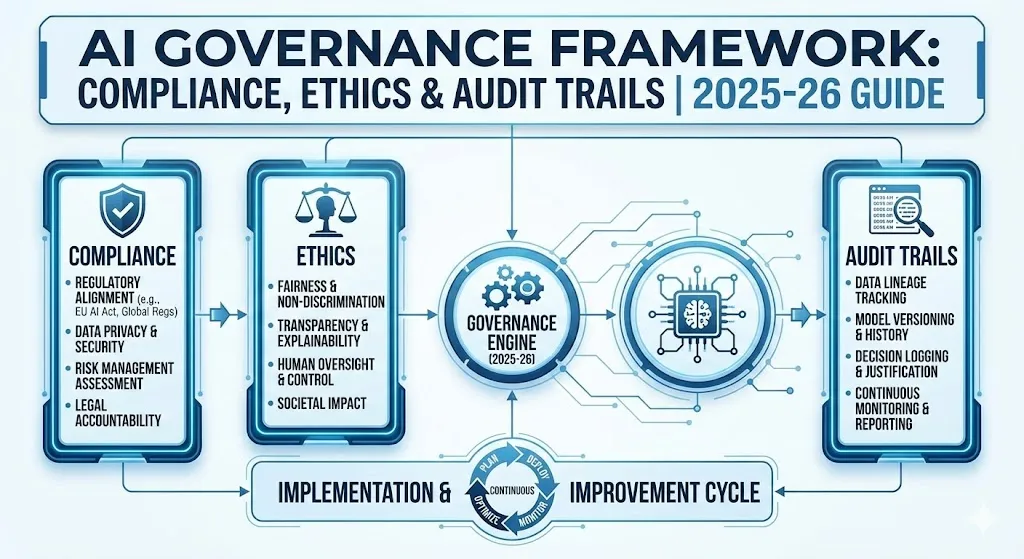
AI Governance Framework: Compliance, Ethics & Audit Trails | 2025-26 Guide The Silent Crisis in AI Adoption: An Introduction Your business just put a machine learning model in place to look at job applications. Two weeks later, you find out that it’s turning down qualified women applicants at twice the rate of men. Your executive team is in a panic. The law wants answers. People in charge are asking questions. And you know that there is no audit trail that shows how the algorithm made its choices, so you can’t prove what went wrong or why. This is not a made-up situation. Companies in all fields are facing a reckoning: they made AI systems without the right safety measures. They moved quickly and used a lot of them, but now they’re trying to figure out what their own algorithms really do. The technology isn’t the problem. It’s the lack of rules. You’re probably thinking about model accuracy, deployment speed, and cost if you’re building or using AI in your business. You might not be thinking about it, but you should be: governance. AI governance isn’t just a bunch of rules for the sake of rules. It’s the difference between new ideas that build trust and new ideas that break it. The infrastructure is what makes sure your AI is ethical, follows the rules, and is responsible. In this post, you’ll learn: We’re going to talk about what AI governance really means, why it matters more than you think, and how to make it a part of your business without slowing down innovation. You’ll learn about the main frameworks that experts use, such as the NIST, the EU AI Act, and India’s new guidelines. You’ll also learn how to spot bias before it hurts real people, how to keep audit trails that regulators expect, and most importantly, why many AI governance efforts fail quietly in organizations and how to avoid that trap. By the end, you’ll have useful ideas for how to put AI governance into practice in your setting. There’s something here for everyone, whether you’re a startup, a big business, or a government agency. 1. What is AI governance, and why is it more important than you might think? Because “AI governance” is used in different ways, let’s start with the basics. AI governance is the set of rules, policies, and structures that tell your company how to create, use, and oversee AI systems. It’s about making sure that AI works in a way that is ethical, open, and follows the rules, all while allowing for new ideas. You can think of it like the guardrails on a highway. You’re not stopping people from speeding; you’re making sure they don’t drive off a cliff. The stakes are high. According to a McKinsey survey, only 25% of businesses have actually put AI governance frameworks into place, even though 65% of them use AI for at least one important task. This means that about 40% of businesses are using AI without proper supervision. They’re working in a governance vacuum, and they may not even know how dangerous it is. This is important because: There is more and more pressure from regulators. The EU AI Act now requires high-risk AI systems to have audit trails. The SEC is looking closely at how financial companies use AI to make decisions. India just put out detailed rules for AI governance that are meant to protect people while also encouraging new ideas. If you can’t show that you have controls in place, your business could be fined a lot of money. When governance fails, trust goes down. Hiring algorithms that are not fair. Facial recognition systems that don’t work for people with darker skin tones. Credit-scoring systems that are unfair. These aren’t just one-time things; they’re patterns. When an AI system acts unethically, it hurts people’s trust in the technology as a whole. That makes it harder for you to hire good people, get customers, and run your business without having to worry about the rules all the time. In fact, governance is a competitive edge. Companies with mature AI governance can move faster because they have the right systems in place. They find problems early on. They don’t panic when rules change. They keep good workers because they trust the company’s commitment to doing the right thing. The main point is that AI governance isn’t just a box to check for compliance. That’s how you make AI that lasts and helps your business and society. 2. The Five Pillars of AI Ethics: Laying the Groundwork for AI That Is Responsible Ethics is the base, and governance is the framework. Without ethics, there can’t be any governance. There are five main parts to responsible AI, and they all depend on each other. Responsibility Someone has to take responsibility for the outcome. If your AI model makes a choice that hurts someone, regulators won’t accept “the algorithm decided.” They’ll want to know who gave the model the go-ahead. Who is keeping an eye on it? Who is to blame if it doesn’t work? To be accountable, you need to make sure that everyone in your organization knows what their role and duties are. It means that someone has the power to say no to a model if it doesn’t meet your moral standards. It means keeping track of everything so that you can find out who made decisions when questions come up—and they will. Clear and open People say that AI systems are like “black boxes.” You give them data, and they make a decision, but no one knows why. Transparency changes that. It means that your AI systems can tell you why they did what they did. The system tells you why your loan application was turned down. When a hiring algorithm flags a candidate, it writes down why. People and stakeholders can trust you more when you are open and honest. This is where explainable AI (XAI) comes in. It’s a group of

AI Governance Framework: Compliance, Ethics & Audit Trails | 2025-26 Guide Read More »

reproducibility-in-ml

Reproducibility in ML: Why Your Results Don’t Match | Best Practices 2025-26

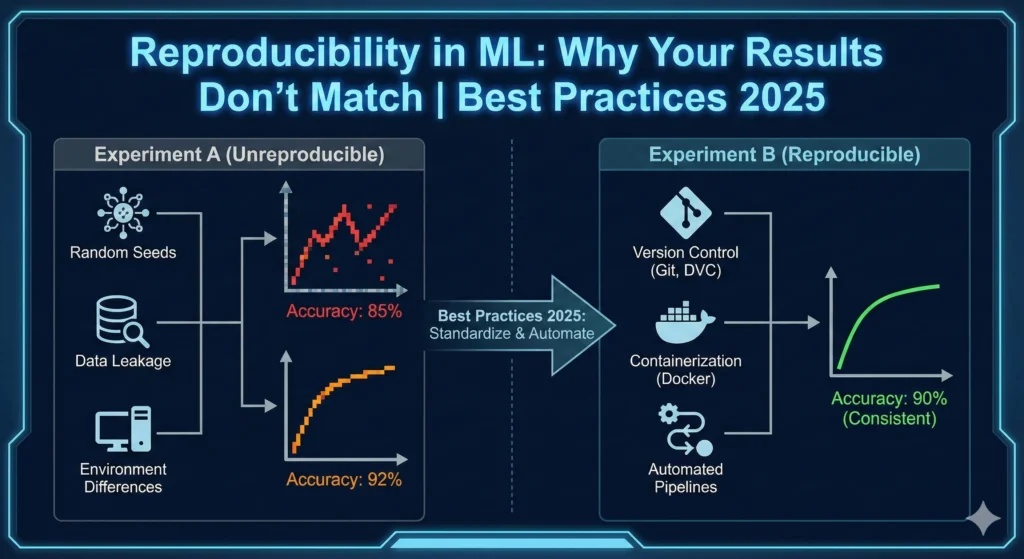
Reproducibility in ML: Why Your Results Don’t Match | Best Practices 2025-26 Introduction: The Unseen Problem in Your Study You spend three weeks carefully following the steps in a published paper. You get their dataset, set the same hyperparameters, and run their code. But something is wrong. What they said doesn’t match what you found. You mix things up. You try different seeds at random. You look at the versions in the library. Nothing. The accuracy drops by 5%. The F1 score changes in a way that isn’t normal. And then you realize with a sinking feeling that you just went through what millions of researchers are going through right now. This isn’t about being careless. It’s not about not being good at something. Welcome to the machine learning reproducibility crisis. Researchers who are very careful don’t always get the same results, and sometimes they can’t even get the same results from their own work from a month ago. The problem is that it is costing the whole field billions of dollars in wasted computing power, duplicated research, and broken trust. The worst part is? A lot of people don’t even know it’s happening. This post will show you: We’re going to talk about why ML doesn’t work (hint: it’s a lot more complicated than just forgetting a random seed), look at the real human and financial costs, go over some real-life examples of when it went wrong, and most importantly, show you exactly how to avoid becoming another statistic in this crisis. By the end, you’ll know not just the “why,” but also the “how”—the exact steps you can take to make your ML work reproducible. Part 1: What Is the Problem with Reproducibility? What Does It Mean to Be Able to Be Reproduced? Let’s start with the basics since this word is used a lot. In machine learning, reproducibility means that you get the same results every time you run the same algorithm on the same dataset in the same environment and with the same settings. A lot of people think that reproducibility and replicability are the same thing, but they are not. Consider it this way: Reproducibility: You should get the same results if you have the same code, data, and environment. Replicability: Means that you can use different data, methods, and settings and still get the same results. Things have to be able to be done again for science to work. You can’t learn from results that you can’t see. Levels of Reproducibility: From Description to Full Experimentation The framework for reproducibility above shows four ways that research can be reproduced. Most of the papers that have been published are either R1 (just a description) or R2 (code without any information about the data or the environment). R4, the highest level, needs everything: the full experimental setup, environments that can be repeated, all data, and documented dependencies. How bad is this? In 2016, Nature sent out a survey to more than 1,500 researchers. The results were very unexpected. More than 70% of the scientists said they had tried and failed to get the same results as another scientist. But here’s the kicker: more than half of them couldn’t even do the same experiments they had done weeks or months before. Nature 2016 Survey: How Researchers Handle Reproducibility This wasn’t just happening in one place. When the numbers were broken down by field, they stayed stubbornly high: 87% of chemists, 77% of biologists, 69% of physicists, and 67% of medical researchers all said they couldn’t reproduce their results. The term “reproducibility crisis” became very popular after Ali Rahimi’s controversial NeurIPS talk in 2017. In that talk, he said that ML research had become “alchemy”—lots of intuition, lots of luck, and not enough rigorous science. The speech got everyone in the community excited. Part 2: Why Your ML Results Don’t Make Sense The Real Culprits (It’s Not Just Random Seeds) Most people think that problems with reproducibility are simple. You only need to set a random seed, a numpy seed, and a torch seed to get started, right? Nope. That’s like believing that changing the oil will fix a broken transmission. Barrier #1: Not Keeping Track of Experiments (The Silent Killer) This is the worst thing that could happen. It is almost impossible to do experiments again if ML teams don’t write down their inputs and new decisions. Think about what happens in a normal ML process. You change the hyperparameter to see what happens. It doesn’t work. You change how quickly you learn. Not very good yet. You change how big the batch is. A little bit better. You change the function that activates it. That’s good enough. But you probably forgot to write this down: What version of TensorFlow or PyTorch you have The exact steps you took to get ready If you standardized or normalized the data, The ways you added more data What samples you used to train your model How you handled values that weren’t there If you chose any features These are all “silent” choices that your code makes, usually through default parameters in libraries. It’s easy to forget about them when you write up your method. But any one of them can have a big effect on your results. Only 6% of researchers at the best AI conferences make their code available to the public. That means that 94% of papers are at reproducibility level R1 or R2. This means that they only have descriptions and maybe some code, but not the whole experimental setup. Barrier #2: GPU Non-Determinism (The Hardware Betrayal) Even if you set all of the random seeds correctly, your GPU may still give you different results each time you run it. This should make you scared. Here’s why. Modern GPUs don’t care about order. Floating-point operations are important because of how computers round numbers and keep track of them. They make operations as fast as they can. When you use parallelization, you might get slightly different

Reproducibility in ML: Why Your Results Don’t Match | Best Practices 2025-26 Read More »

ml-models

How to Keep ML Models Accurate in Production by Building a Continuous Retraining Pipeline

How to Keep ML Models Accurate in Production by Building a Continuous Retraining Pipeline A lot of people don’t expect this: as soon as you put a machine learning model into production, it starts to get worse. Not right away, but soon. The information changes. People’s behaviour changes. The state of the market changes. The patterns that your model learned during training don’t matter as much anymore. This is known as model drift, and it’s like having a GPS that slowly stops working as roads change shape. It doesn’t matter how great the original route was. Most teams see model deployment as the end of the road. They celebrate, start the next project, and hope that everything goes well. Then, three months later, all of a sudden the predictions are wrong, the accuracy drops, and no one knows why. At that point, the damage has already been done. This is when continuous retraining comes into play. A continuous retraining pipeline is an automated system that keeps an eye on how well your model is doing, finds problems, and updates the model with new data—all without you having to do anything. Instead of a model that stays the same, think of it as a living, breathing system that keeps changing. We’ll show you how to build one from scratch in this post. We’ll talk about different ways to trigger things, real-life examples from companies like Uber and Netflix, how to put these ideas into action, and the tools that make it all happen. By the end, you’ll not only know what a continuous retraining pipeline is, but also why it is becoming an important part of any serious ML operation. First, let’s figure out what the real problem is that we’re trying to solve. What is model drift? (And Why It Ruins Your Weekend) Model drift happens when the connection between the data you put in and the output you expect changes over time. Does it sound abstract? Let me make it real. Think about making a loan approval model that learned from data from 2022. In the past, certain income levels and credit scores were good at predicting repayment. Today, things are different with the economy, interest rates are different, and what seemed like a good lending signal in 2022 might not mean anything now. Your model is still using the old logic, which means it keeps making worse and worse choices. You need to know about a few different kinds of drift: A four-quadrant infographic explaining different types of model drift with icons and definitions. Data Drift (Feature Drift): The way your input features are spread out changes. A good example is a model that recommends stores based on summer shopping habits that is now getting winter data. The ways people like to buy things are very different. The model sees patterns it doesn’t know and has trouble. Concept Drift: The way features relate to what you’re trying to predict changes completely. This is an example of concept drift in the loan example above. The features are still there, like income and credit scores, but their meanings have changed. Prediction Drift: The predictions your model makes start to change in how they are distributed. This often happens before accuracy really starts to drop, which can help find problems early. Label Drift: The distribution of the target variable changes. When fraudsters change their methods, a fraud detection model that was trained on past fraud patterns might not work as well. Here’s the deal: most teams only notice drift when it’s really bad. A continuous retraining pipeline finds it early and deals with it in a planned way. Comparing Different Ways to Retrain Models: Finding the Right Balance Between Performance, Cost, and Complexity Knowing What Triggers Your Retraining: Not All Timing Plans Are the Same When should your pipeline get a new training? This choice affects the whole structure of your building. There are three main ways to do it, each with its own pros and cons. Strategy Trigger Mechanism Pros Cons Best For 1. Scheduled Time-based (e.g., Weekly) Simple, predictable Can be wasteful or too slow Stable domains 2. Event-Based Drift metrics / Performance drop Efficient, responsive Complex monitoring needed, false positives Critical/High-cost systems 3. Hybrid Schedule + Event Triggers Balanced safety & efficiency Moderate complexity Most production ML (Uber, LinkedIn) Strategy 1: Retraining on a set schedule (time-based) The easiest way to do this is to retrain every Monday at 2 AM, every day, or every week. Not complicated, easy to understand, and easy to put into action. What’s the catch? You either retrain too often (wasting computer resources when nothing has changed) or not often enough (your model gets old). It’s like watering a plant on a set schedule, even if it doesn’t need water. Best for: business domains that are stable and where data changes in a predictable way, or when you’re just starting out. Strategy 2: Retraining that is based on events or changes Here, you set up monitoring to look for drift in your data, model predictions, or actual performance metrics. When drift goes over a certain level, BAM automatically starts retraining. Only train again when you need to. The good news? Much more effective. You’re not wasting time and money on unnecessary retraining. The bad thing? To do good drift detection, you need a complex monitoring system. You can also get false positives, which means that a one-time problem causes retraining even though nothing bad happened. Best for: systems with a lot of data, expensive computing environments, or models that are critical to the mission and can’t afford to have old models. Strategy 3: A mix of the two (recommended) This puts them together. You have a basic schedule (weekly retraining), but you also have event triggers that speed up retraining if drift is found. If drift happens on Tuesday, boom! Get the new model out before your scheduled Friday run. You still get the weekly refresh if everything goes well. Companies like

How to Keep ML Models Accurate in Production by Building a Continuous Retraining Pipeline Read More »

monitor-ml-models

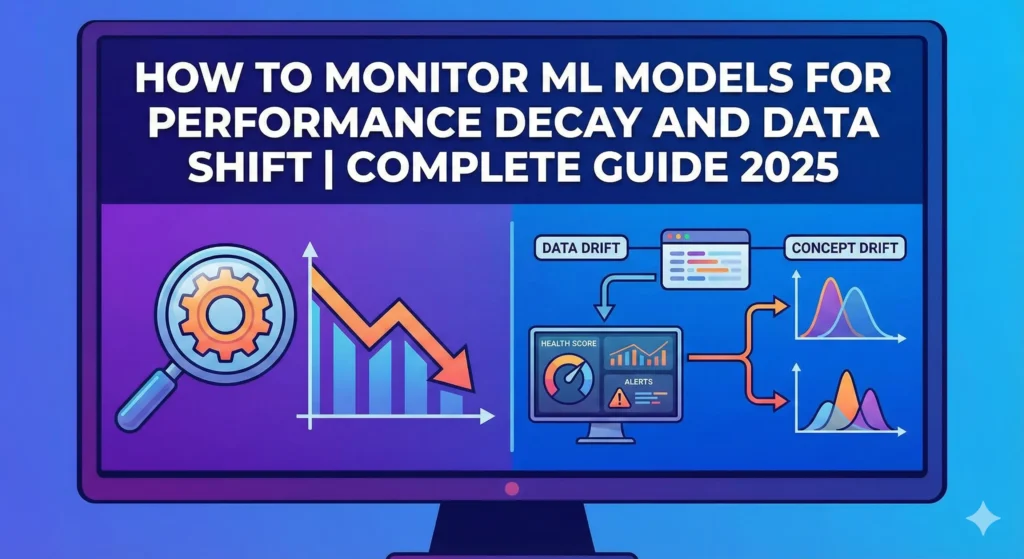
How to Monitor ML Models for Performance Decay and Data Shift | Complete Guide 2025

 How to Monitor ML Models for Performance Decay and Data Shift | Complete Guide 2025 1. Introduction: The Quiet Killer of ML Models in Production You build a machine learning model, test it thoroughly in your development environment, and then deploy it to production with confidence. The numbers look good. Your stakeholders are pleased. Three months later, your model’s accuracy drops by 15%, but no one notices until your business metrics start to fall. This is what 91% of ML teams have to deal with. MIT and Harvard research shows that almost all production machine learning models get worse over time. But most teams don’t have a way to find this degradation until it’s too late and it’s already doing damage. The uncomfortable truth is that your model isn’t the problem. Things changed in the world around it. The ground is always shifting under your models’ feet, whether it’s because customers are acting differently, the market is changing, or the data pipeline is corrupting new features. You’re flying blind if you don’t have a good monitoring system in place. While you’re busy adding the next shiny feature, your model quietly breaks. This guide tells you everything you need to know about keeping an eye on machine learning models that are in use. We’ll talk about data drift, concept drift, performance decay, how to find them, how to use Python, and the tools that really work. At the end, you’ll have a useful plan for keeping your models in good shape and protecting your business from hidden model failures. Let’s get to work. 2. Understanding Model Decay: Why Models That Are Perfect Don’t Work We need to know what’s really broken before we can talk about how to find problems. Model decay is when a machine learning model’s performance gets worse over time, even though it worked perfectly when it was first put into use. Your model is fine. The information it sees has changed. It doesn’t work the same way in production as it did during training. It’s like making a weather prediction model using data from the past ten years. That model works great for the next year. But by the third year, the weather patterns have changed a little. It’s not that your model is bad; it’s just that the climate it was trained on doesn’t exist anymore, so its predictions are less accurate. The Actual Cost of Model Decay Not paying attention to model decay is more than just a technical issue. It has a direct effect on your business. Researchers at MIT looked at 32 datasets from a number of industries and found that: 75% of businesses saw AI performance drop when they didn’t keep an eye on it. More than half said that AI mistakes cost them money. Error rates on new data go up 35% when models are not changed for six months or more. Some industries decay quickly (financial models break down in weeks), while others decay more slowly (image recognition stays stable for longer). Decay is very important in systems that find fraud. If an insurance company’s fraud model is based on past fraud patterns, it might not catch newer, more advanced ways of committing fraud. Your company has already paid out fake claims by the time you realise that it’s not catching fraud well. 3. What’s Really Going On: Concept Drift vs. Data Drift This is where most people get lost. They use the word “drift” in a lot of different ways. But there are actually different kinds of drift, and it’s important to know the difference because they need different fixes Data Drift (Shift in Covariates) When the input data distribution changes between training and production but the relationship between inputs and outputs stays the same, this is called data drift. Picture that you made a model that can guess how much a house will cost. There were 80% suburban houses and 20% urban houses in your training data. Your real estate company starts to focus more on urban listings six months into production. Now, 60% of the data you enter is about urban properties. Your model still knows how to guess prices. The model’s reasoning is still sound. But it’s getting a very different set of input data than it was trained on. That’s what data drift is. For example, a credit scoring model that was trained on data from 2019 to 2020 suddenly has to deal with job patterns from 2024. The unemployment rate rose in different ways, the income distribution changed, and the way people borrowed money changed. The model sees inputs it has never seen before during training. Concept Drift (Label Shift) It’s harder to deal with concept drift because you can’t see it in your data. It happens when the link between the inputs and the target variable changes, even if the input data distribution looks the same. A system for finding spam is a great example of this. Your model learnt how to tell the difference between spam and not spam by looking at how people spammed in 2022. But spammers got better. They are using new ways of writing, different sender addresses, and new ways of formatting. The input data may appear similar, but the definition of spam has fundamentally evolved. A model for insurance fraud that was trained on common fraud patterns suddenly has to deal with new ways of committing fraud. Codes for medical care change. Rules in the state change. New kinds of claims come up. The model still gets medical claims that look the same, but the patterns that show fraud have changed completely. Drift Type The Problem The Fix Data Drift Input distribution changes. Model might handle it, or might need retraining. Concept Drift The fundamental logic changes. Must retrain with new data The catch is that concept drift almost always means that the model needs to be retrained. Data drift might not. Your model might be able to handle different input distributions without having to be

How to Monitor ML Models for Performance Decay and Data Shift | Complete Guide 2025 Read More »

ai-models

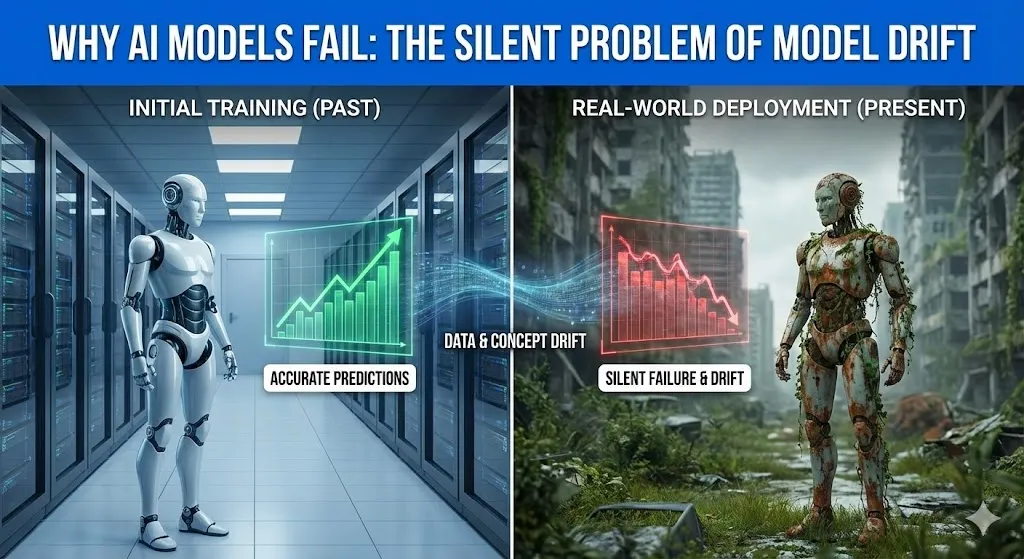
Why AI Models Fail: The Silent Problem of Model Drift

The Reason AI Models Fail: The Silent Problem of Model Drift   Have you ever heard one of these big-brained geniuses on about the future? I mean people such as Stephen Hawking. Later in his life he began to become extremely vocal about artificial intelligence. He cautioned that the invention of an actual thinking machine would be the worst or the best thing to have ever occurred to humankind. He was not concerned with evil, with killer robots like in the movies. His trepidation was over something less noisome: ability. What will occur once a machine becomes intelligent, quick enough to the point that its ambitions and ours simply cease to coincide anymore? It’s a big, scary thought. However, what would you say to the idea that the greatest danger to your AI as of now does not lie in the so-called superintelligence that will end up conquest of the world? It is a far more covert, subtler issue. That is why the majority of AI projects fizzle out and fail quietly. Artificial intelligence is not the most challenging aspect of creating the model. It is holding true to it because the world is evolving. Majority of AI systems fail not due to poor models, they fail due to the world they are trained on becoming not the world that they are applied to. This selfless issue is referred to as model drift. And it is noisily humiliating the AI performance in manufacturing systems all over. In this posting, we will deconstruct it all. We will discuss what model drift is, why it is a silent killer and examine one of the huge, real-life failures that cost a company more than half a billion dollars. It will all make sense to you by the end and what you can do about it. What is AI Model Drift? So What? Alright, we should abandon the technological lingo. Think about the whole semester of studying history in a cram study. You are well informed about the World War II the dates, the battles, the major personalities. You enter an exam when you are feeling confident, and then you realize that all the questions are regarding the social media trends of the 2020s. You’d fail, right? I am not saying you are dumb, but you have inherited studying the concept (WWII history) that is no longer required on the test (the world today). This is model drift in a nutshell. It is the inherent atrophy of a predictive capability on an AI model, due to the fact that the world it was trained on is no longer the same. Your model is yet to stop, still at work. It has not gone down or emitted error messages. And it is simply fading away, gradually becoming dumb. And this is a colossal issue as such silent failures make bad business decisions. A Data Drift versus a Concept Drift: The Two Villains Model drift is not a single bad thing, but rather a pair. Imagine them as two distinct forces that are just coming into your perfect world of the model and throwing everything off. These are the so-called data drift and concept drift. They are close but they confuse everything in their own peculiar way. Comparison Table: Data Drift vs. Concept Drift Feature Data Drift (Covariate Shift) Concept Drift Simple Analogy The nature of the music requests varies. The definition of the cool music varies. What Changes? The characteristics of the input data vary. The dependence between the input and the output varies. Example You have created a fashion recommendation AI that is mostly trained on the information of customers aged 30s and 40s. Then, one day your app is trending with teenagers. Input (age of the user, preference of style) is no longer the same. Your model is currently proposing blazers to Gen Z. Your artificial intelligence forecasts defaults on loans. It was conditioned to the time of low risk in a time of low unemployment. However, nowadays, even those employed have become defaulting (the idea of low risk has been transformed by the recession). There is the same input (employment status), but with a changed meaning to the prediction. Is the Model Wrong? Technically, no. It is merely manipulation of data that it has never encountered. Yes. Its main reasoning has become obsolete. These two tend to occur concurrently. To consider an example, the COVID-19 pandemic overturned the buying behavior of people in a single night (data drift) and changed their view of what they perceived as a necessary purchase (concept drift). Models used to detect fraud, as well as manage inventory, were flying blind. A Real-World Disaster: Trying to lose a Half-Billion of dollars to Model Drift at Zillow To find a more perfect and painful instance of model drift, go no farther than Zillow does. In 2018, Zillow introduced a program, the name of which was Zillow Offers. The idea was revolutionary. Their future values would involve using a strong AI model (the successor of their Zestimate) to estimate the future value of a home, purchase it directly off the seller, give it a few touch-ups, and sell it to someone at a profit. They were so sure that they are going to get billions. For a while, it worked. The real estate market was burning. Prices were only going up. The model was trained on this fact, and it learned a simple rule which is to buy houses, as tomorrow they will have a higher value. And then, the world changed. The housing market began to decelerate in the middle of 2021. However, the model of Zillow did not receive the memo. It was also conditioned on years of data of a hot market and proceeded to recommend the acquisition of homes at excessively high prices, which however, would remain the same way it had been. This is archetypal concept drift. The correlation of the attributes of a home and its future selling value was now to be

Why AI Models Fail: The Silent Problem of Model Drift Read More »

edge-ai

Edge AI: Running Models on Phones and IoT Devices

Edge AI: Using Phones and IoT Devices to Run Models Your phone will unlock as soon as it sees your face. Your smartwatch can tell when your heart is beating too fast and warn you before you even feel dizzy. A factory camera can find a broken item on the assembly line in less than a second. These devices aren’t asking the cloud for help; they’re making decisions on their own, right there and then. Welcome to the world of Edge AI, where AI isn’t just in a faraway data center; it’s also on your wrist, in your pocket, or watching your home. It’s quick, it’s private, and it changes how we use technology every day. You’re in the right place if you’ve ever wondered how your phone can hear you even when you’re not connected to the internet, or how a security camera can tell the difference between your cat and a burglar without sending the video to the cloud. We’re going to explain Edge AI in a way that everyone can understand, even if they don’t have a PhD. You’ll find out what it is, why it matters, how businesses are using it now, and what the future holds. You’ll understand why this technology is quietly changing everything from healthcare to smart cities by the end. 1. What is Edge AI, exactly? (And Why You Should Care) Let’s get started. Edge AI is a type of artificial intelligence that doesn’t use cloud servers to do the heavy lifting. Instead, it runs directly on devices like phones, smartwatches, security cameras, factory sensors, and cars. When you need help, traditional AI is like calling a very smart friend who lives far away. You tell them what’s wrong, wait for them to think about it, and then wait for their answer to come back. Edge AI is like having a smart friend who lives with you. They are always there when you need them, they answer right away, and your conversation stays private. The “edge” part is where data is made, which is at the edge of the network, near you. Your phone’s camera, your fitness tracker’s heart rate sensor, and your car’s radar are all examples of edge devices. Edge AI is when AI runs on these devices instead of in the cloud. Why This Is More Important Than You Think We have too much data, though. Some people think that IoT devices will make more than 79 zettabytes of data by 2025. That number is so big that it doesn’t mean much, but in practical terms, it means we can’t send all that data to the cloud. It would take too long, cost too much, and to be honest, most of it isn’t even worth sending. Edge AI fixes this by processing data on the spot. Your security camera doesn’t send hours of footage showing nothing. It only alerts you when it sees something suspicious. Your smartwatch doesn’t send every heartbeat to the cloud. Instead, it looks for patterns locally and only tells your doctor when something is wrong. 2. The Secret Sauce: What Edge AI Really Does Okay, let’s take a look under the hood. How does AI work on a device that fits in your pocket when traditional AI models need huge servers? Models that are smaller and smarter Making AI models that could fit on tiny chips was the first big step forward. Keep in mind that your phone doesn’t have the same processing power as a data center. Early AI models were huge, like hundreds of gigabytes. What are edge AI models? Some are only a few megabytes. Researchers made architectures like MobileNet and other “lightweight” neural networks that are made just for edge devices. These models are built to be efficient from the ground up, not just smaller versions of bigger ones. Model Compression: The Magic Tricks Even models that are already small need to get smaller. That’s when optimization methods come in: Quantization: is like making a high-resolution picture into a smaller file. Quantization changes 32-bit floating-point numbers into 8-bit integers instead of keeping them as they are. Floating-point numbers are very accurate but take up a lot of memory. This makes the model four times smaller and can speed up inference by up to 69%. Most of the time, you won’t even notice a drop in accuracy. Pruning: gets rid of the “dead weight” in neural networks. Think of a tree that has some branches that don’t make fruit. You severed them. The same idea: pruning cuts out connections in the network that don’t help much with the end result. You can cut 30–50% of a model without hurting its performance, and in some cases, even up to 90%. Knowledge Distillation: In Knowledge Distillation, a big, accurate “teacher” model teaches a smaller “student” model how to act like it does. The student learns the patterns without having to know all the details. It’s like learning to play guitar from Jimi Hendrix: you won’t be as good, but you’ll be pretty close, and you don’t need to have been doing it for decades. The Evolution of Hardware The chips themselves are also getting smarter. Neural Processing Units (NPUs) are special chips in today’s smartphones that do AI tasks without using up your battery. Some examples of specialized hardware made just for running AI at the edge are Google’s Edge TPU, Qualcomm’s AI Engine, and Apple’s Neural Engine. These chips can do trillions of operations per second and only use a few watts of power. That’s enough power to run complicated computer vision models that would have needed a desktop GPU just five years ago. 3. The Tools That Make Edge AI Frameworks Work When you talk about Edge AI, you have to talk about the software frameworks that make it work. These are the tools that developers use to turn their trained models into something that can run on your phone or other smart device. Framework Best For Key Feature TensorFlow Lite

Edge AI: Running Models on Phones and IoT Devices Read More »

docker-for-data-science

A Beginner’s Guide to Docker for Data Science: Putting AI in Powerful Containers

A Beginner’s Guide to Docker for Data Science: Putting AI in Powerful Containers You spend weeks working on your laptop to create a great machine learning model. It works perfectly. You’re happy. Then you try to run it on a coworker’s computer, but it crashes. It appears that a different version of Python is being used. Missing libraries. A number of settings that are all messed up. Does this ring a bell? Docker is going to be your new best friend if you’ve ever pulled your hair out trying to get someone else’s code to work or wondered why your model works on your machine but not on anyone else’s. I get it. At first, “containerization” and “Docker” sound like things that only DevOps engineers need to know. But here’s the thing: Docker is one of those tools that will make you wonder how you ever got by without it. And by the end of this guide, you’ll know exactly how to use it for your data science projects. What You’ll Learn and Why It Matters We’ll show you everything you need to know about using Docker for data science and AI. No extra words or hard-to-understand language—just useful information. You’ll learn: What Docker is Why it’s important for your ML projects How to make your first container How to make workflows that work on any machine, every time. What do you gain from it? You will save hours (or even days) fixing problems with your environment, make your work reproducible, and deploy models like a pro. Let’s get started. Why Docker is a game-changer for data scientists   The “It Works on My Machine” Problem You know that uncomfortable moment when you give your notebook to your team and they can’t get it to work? Or when you trained a model six months ago and can’t even remember what versions of the libraries you used? Docker takes care of that issue. Docker packs all the parts your app needs into a single, tidy box called a container. This includes your code, all the libraries, the right versions, and the files that set things up. It’s like a lunchbox that has everything you need to eat a full meal. No matter where you open it, whether it’s in New York or Tokyo, you’ll get the same food. What makes Docker different from virtual machines? You might be thinking, “Isn’t this just like a virtual machine?” Not really. Feature Virtual Machines (VMs) Docker Containers Analogy Like making a whole house just to store your shoes. Like a lightweight lunchbox. Weight Heavy, take a long time to start up, use a lot of resources. Light (megabytes instead of gigabytes). Startup Time Minutes. Milliseconds. Capacity Consumes a lot of space. Run dozens on the same computer. Virtualization Virtualizes the hardware. Only virtualizes the operating system layer. The main difference is that VMs virtualize the hardware, while Docker only virtualizes the operating system layer. This makes containers much better for what we really need in data science: environments for our code and models that are always the same and can be moved around. The Real Advantages of AI and ML Work Let me go into more detail about why Docker is important for machine learning: Consistency: It doesn’t matter if you train a model on your laptop, a server, or in the cloud; it will work the same way. No more “it works on my machine” excuses. Reproducibility: Do you remember the big news from three months ago? Docker captures the whole environment, so you can exactly reproduce it. This is very important for both research and production. Collaboration: Collaboration is easy because everyone on your team can work in the same space. Just send out the Docker image, and everyone will know what’s going on. Faster Deployment: Package all of your model’s dependencies together and then deploy it anywhere. Cloud platforms really like Docker containers. Resource Efficiency: Because containers use much less memory and CPU than virtual machines, you can run more experiments at the same time. Easy Access to GPU: Do you need to use a GPU to run your deep learning model? Docker has built-in support for NVIDIA. The Basic Ideas Behind Docker Before we start building things, let’s get the words right. Don’t worry; you only need to know a few simple things. Pictures: Your Plan A Docker image is like a recipe or a template. It is a read-only file that contains all the files your application needs to run, such as the operating system, your code, libraries, dependencies, and other files. A picture is like a picture of the whole world. You can’t run an image right away; you have to turn it into a container first. Containers: The Instance You Are Running You get a container when you run an imge. This is the real, working version of your app. The container is the food you made from the recipe, and the picture is the recipe. You can make more than one container from the same picture, just like you can make more than one cake from the same recipe. Each container works on its own and is not connected to the others. Dockerfile: Your Recipe Card A Dockerfile is a file that tells Docker how to create an image. It’s like writing down the steps so that anyone can make your space again. Here’s a very simple example: Dockerfile FROM python:3.9-slim WORKDIR /app COPY requirements.txt . RUN pip install -r requirements.txt COPY . . CMD [“python”, “train_model.py”] This Dockerfile says, “Start with Python 3.9, set up a working directory, install my dependencies, copy my code, and run my training script.” Simple, right? Docker Hub: Your Recipe Book GitHub is a place to store code, and Docker Hub is a place to store Docker images. This big online registry has ready-made images for just about anything. You can use Python, TensorFlow, PyTorch, Jupyter notebooks, and more. You don’t have to start over; you can just get

A Beginner’s Guide to Docker for Data Science: Putting AI in Powerful Containers Read More »

The Rise of Serverless ML

7 Ways The Rise of Serverless ML Is Deploying Models without Servers for Explosive Performance

The Rise of Serverless ML: Deploying Models without Servers for Explosive Performance An Introduction to the Problem No One Wants to Talk About Honestly, it’s a pain to take care of the infrastructure for machine learning. You made your model as good as it could be, but now you have to face the facts: to make predictions, you need servers that are always on. Some days you get a few requests. What about the other days? The traffic gets crazy. In either case, you’re paying for space that you don’t use much. This is where serverless machine learning comes in. It’s not a made-up word that your cloud provider uses to sound cool. It’s really fixing a problem that data teams have had for a long time. Serverless ML lets you use machine learning models without having to deal with any servers. No provisioning, no scaling configuration, and no watching over the infrastructure. You send your model to the cloud provider, and they do the rest. You only pay for what you use, even if it’s just a millisecond. We’ll talk about how serverless ML works, why it’s becoming the default choice for inference workloads, how much money you can really save, and how to deploy models right now in this post. By the end, you’ll understand why companies and new businesses are moving away from the old ways of installing software. What does “serverless ML” mean? When you use serverless machine learning, you put ML models on cloud infrastructure and the provider takes care of all the computing, storage, and networking that happens behind the scenes. There are still servers, but you don’t have to take care of them. Setting up servers the old-fashioned way is like owning a house. You pay for the house even if no one lives there, keep the roof in good shape, and fix the plumbing. Serverless is like Airbnb in some ways. You only pay for the nights you stay, and someone else takes care of the cleaning. In an ML environment with no servers: You only think about making models and making them better. The cloud provider handles security, provisioning, scaling, and patching. You only pay for the time your model actually needs to do its work. Infrastructure can handle anywhere from zero to thousands of requests at the same time. This is not at all like running your own EC2 instances or a Kubernetes cluster. No planning for capacity, no checking on the server’s health, and no fighting with configuration files. The Serverless Cost Model: Pay for Each Function, Not for Each Server The serverless cost model is what really sets this apart. You pay for three things: Function calls: The number of times your model is called Milliseconds are used to measure how long it takes to run. Memory allocated: The amount of RAM that your function needs For example, AWS Lambda costs about $0.20 for every million requests and $0.0000166667 for every GB-second of computing power. You will only have to pay less than $5 a month if your model makes 100 inference requests every day and uses 1GB of memory for 200 milliseconds each time. What about servers that aren’t dedicated? You’d still have to pay hundreds of dollars for the instances that are just sitting there. This pricing model makes you think about deployment in a very different way. You have to keep your model running all the time with traditional infrastructure to make it worth the money. Serverless makes you want to write code that is fast and efficient, which is a good way to get better at engineering. What the Market Says About the Rise of Serverless ML We don’t have to guess anymore. The serverless computing market is growing quickly. The Serverless Computing Market Will Grow From 2024 to 2033 In 2025, the global serverless computing market will be worth about $26.51 billion. It is expected to be worth $76.91 billion by 2030, with a yearly growth rate of 23.7%. In 2024, the serverless platform market was worth $21.3 billion. By 2031, it is expected to be worth $58.95 billion. But what I find most interesting is A lot of people are using AI and machine learning together. In 2025, the number of serverless ML training use cases went up by 58%. This was because serverless ML training was more adaptable and could be easily scaled up or down for one-time jobs. In 2025, the best cloud platforms sold more than $6.2 billion worth of model inference APIs. Netflix uses serverless to run its streaming service and save 40% on infrastructure costs. Airbnb made StreamAlert, their own serverless framework based on AWS Lambda, to help them look at data from all over the company in real time. These are not small businesses testing out new tech. These billion-dollar companies are spending a lot of money on serverless for their most important jobs. How Serverless ML Deployment Actually Works Let’s talk about what happens when you put a model on a platform that doesn’t have servers. Step 1: Put your model in a box (or not) First, you need to package your model. Two different ways are available on most platforms: Option A: A picture of a containerYou create a Docker container that holds your model, its dependencies, and the code that runs it. You can use it with any framework, like TensorFlow, PyTorch, or scikit-learn, and it’s easy to move around. Put it in the cloud provider’s registry. Done. Option B: A package of code and a modelIf your code and model are small enough, you can zip them together on some platforms, like AWS Lambda. Containers are usually better for ML models because they make it easy to deal with complicated dependencies. Step 2: Set up an endpoint without a server You send your container to the cloud provider’s serverless platform. This could be: AWS SageMaker Serverless Inference is made just for machine learning and works with SageMaker’s training and preprocessing pipelines.

7 Ways The Rise of Serverless ML Is Deploying Models without Servers for Explosive Performance Read More »